
Aperture — Free Photography Portfolio Website Template
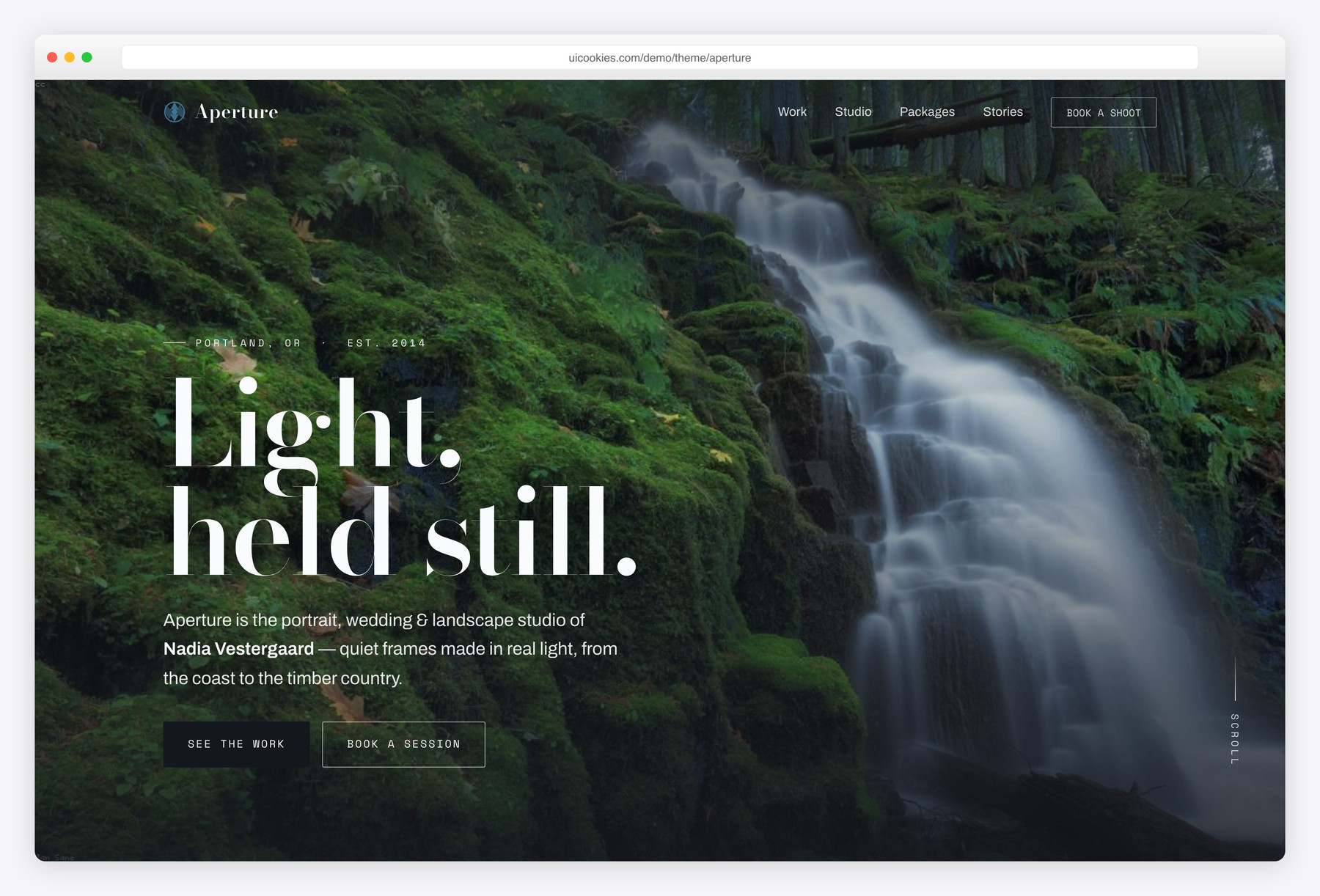
Aperture is a free, single-page photography portfolio built on Bootstrap 5 with no jQuery. Its standout is a hand-written, zero-dependency lightbox wired to a filterable CSS-columns masonry grid, so you can drop in a set of images and have a working portfolio the same afternoon. A darkroom-monochrome palette and film-style EXIF captions keep the photographs front and center.
Key features
- Hand-written vanilla lightbox: prev/next, keyboard arrows, Esc, touch-swipe
- Filterable masonry grid (All / Portrait / Wedding / Landscape) in pure CSS columns
- Space Mono EXIF captions: film stock, focal length, aperture per frame
- Full-bleed hero plus a cinematic featured-story band
- Packages & pricing section with three real all-in tiers
- Front-end-validated contact form with session type and date fields
- Animated stat counters, scroll-reveal, and scrollspy nav via IntersectionObserver
- Responsive 360px to 1440px, prefers-reduced-motion aware, skip link
- Bootstrap 5, no jQuery, no paid plugins
Best for
- Portrait, wedding, and landscape photographers
- A single-page portfolio you can ship the same day
- Studios that list fixed package pricing
- Anyone who wants an image-first, editorial look
- Front-end devs who dislike jQuery bloat
At a glance
- Framework: Bootstrap 5
- License: Free for personal and commercial use
- Pages: 1
- Responsive: Yes
- Style: Darkroom-monochrome, editorial, image-first

How to use it
Download the ZIP, unzip it, and open index.html — no build step, nothing to install. Edit the text and images, point any forms at your backend or a form service, and deploy the folder to any static host. Colours and fonts live in css/style.css; the interactions are in js/main.js.
Frequently asked questions
Is Aperture really free to use commercially?
Yes. You can use it for paid client work or your own studio site, free for both personal and commercial projects. There are no license fees and nothing to unlock. An attribution link back to uiCookies is appreciated but not required.
Does it use jQuery or any paid plugins?
No. Every interactive piece — the lightbox, gallery filter, mobile menu, form validation, animated counters and scroll effects — is hand-written vanilla JavaScript. The only bundled library is Bootstrap 5, and it is self-hosted locally rather than pulled from a CDN. That keeps the template light and free of third-party dependencies.
How does the lightbox work and do I need a library for it?
The lightbox is fully custom and needs no external library. Click any tile to enlarge it, then use the on-screen arrows, your keyboard arrow keys, or a swipe on touch devices to move between frames, and Esc to close. Focus returns to the tile you opened when you close it, so keyboard and screen-reader users stay oriented.
How do I add my own photos?
Drop your JPEGs into the img/ folder, then update each figure with the class ap-tile inside index.html. Point the img src and the button's data-full to your file, and edit the data-caption, data-exif, and data-cat attributes. The data-cat value (portrait, wedding, or landscape) is what feeds the gallery filter buttons, so set it to match your categories.
Can I change the accent colour and fonts without hunting through the CSS?
Yes. The palette and type are defined as CSS custom properties at the very top of css/style.css — variables like –cyan, –ink, and –paper for colour, plus the –f-* variables for fonts. Change those few values and the whole template re-skins in one place, no find-and-replace across the stylesheet.
Is it responsive and does it work on phones?
Yes. The layout is fully responsive from 360px up to 1440px, and the masonry grid reflows its columns as the screen narrows. Touch-swipe navigation in the lightbox and a dedicated mobile menu are built in, and the template respects prefers-reduced-motion so animations calm down for users who ask for that.
Can I edit it without a build tool or command line?
Yes. Aperture is a static front end — plain HTML, CSS and JavaScript — with no build step, package manager, or compilation required. Open index.html and css/style.css in any editor, make your changes, and refresh the browser to see them. You can host the result on any static host or standard web server.
Do the contact form and pricing actually process bookings or payments?
No. The contact form validates its fields (including session type and date) on the front end, but it does not send email or store submissions on its own — you wire it to your own endpoint, form service, or backend. The packages and pricing section is presentational; there is no payment processing or checkout built in.