
Toolbelt — Free handyman & home renovation Website Template
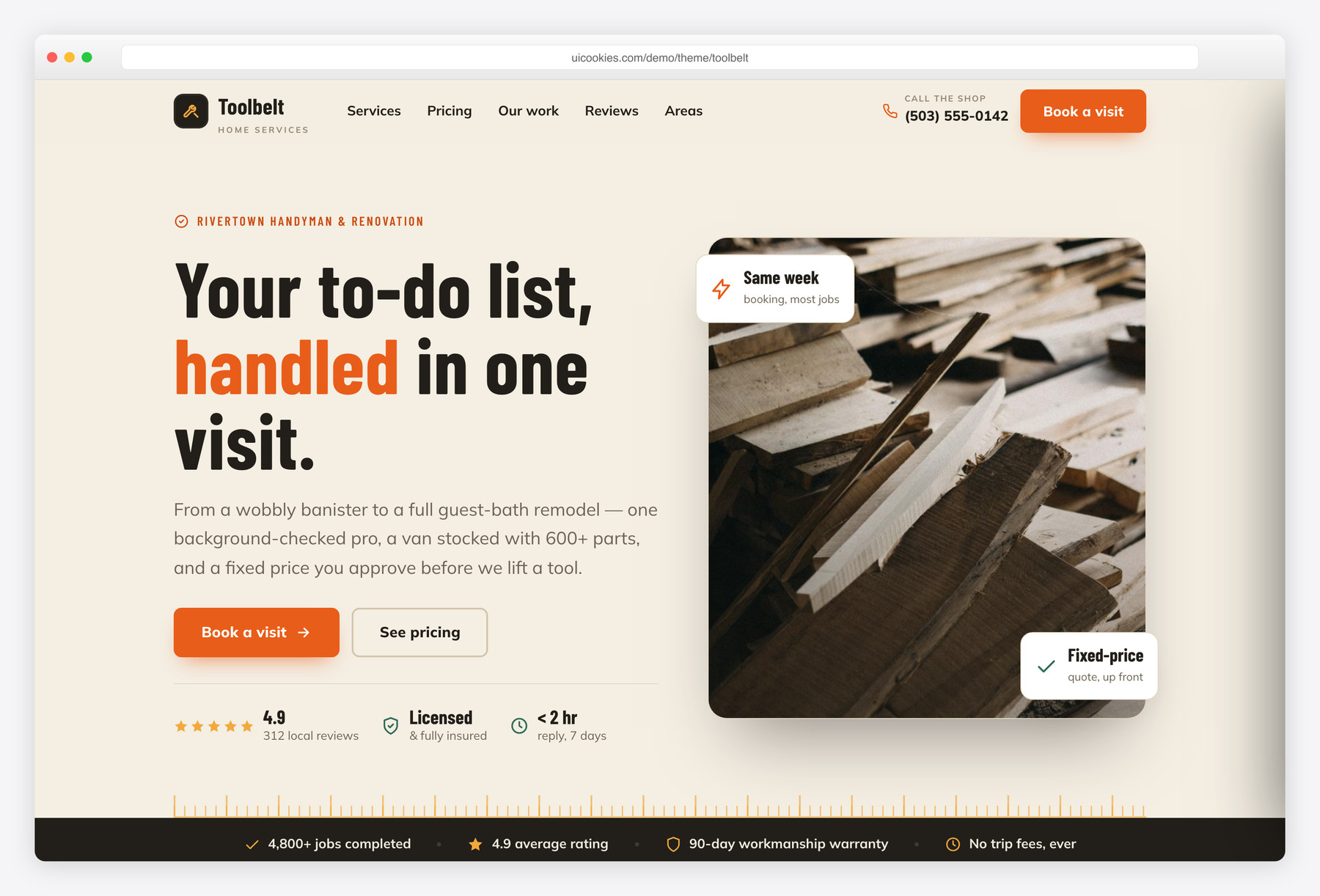
Toolbelt is a free one-page Bootstrap 5 template for a local handyman or home-renovation crew. It leads with up-front pricing tiers styled as kraft workshop price-tags and a genuine drag-to-compare before/after slider, giving it an honest, hands-on feel instead of the usual heavy contractor look.
Key features
- Three up-front pricing tiers styled as hanging kraft price-tags
- Real before/after drag slider (pointer, touch and keyboard accessible)
- Validated booking form with live success message
- Sticky glass header with phone tab and full-screen mobile drawer
- Split hero with trust row and floating fixed-price badges
- Eight-item services grid with inline-SVG icons and 'from' prices
- Four-step 'how it works' band plus IntersectionObserver stat counters
- Stylised service-area radar with neighborhood checklist, no third-party map
- Auto-highlighted opening-hours card and FAQ with FAQPage schema
Best for
- Local handymen and home-renovation crews
- Trades that quote a fixed price up front
- Small contractors who take booking requests online
- Service businesses wanting a friendly, non-corporate look
- A quick single-page launch with no CMS
At a glance
- Framework: Bootstrap 5
- License: Free for personal and commercial use
- Pages: 1
- Responsive: Yes
- Style: Warm workshop local-service — signal orange & pine on canvas, condensed signage type

How to use it
Download the ZIP, unzip it, and open index.html — no build step, nothing to install. Edit the text and images, point any forms at your backend or a form service, and deploy the folder to any static host. Colours and fonts live in css/style.css; the interactions are in js/main.js.
Frequently asked questions
Is Toolbelt really free to use?
Yes. Toolbelt is free for both personal and commercial projects. Swap in your own brand name, colors, photos and copy, then ship it. An attribution link back to uiCookies is appreciated but not required.
Does it need a build step, jQuery or a framework?
No. It is static HTML with one hand-written CSS file and one vanilla-JavaScript file, and Bootstrap 5 is self-hosted locally. Just open index.html or drop the folder on any host. There is nothing to compile, no jQuery and no external JS to load.
How do I change the services, prices and service area?
Everything is real markup you edit by hand. Prices live in the pricing tags and the services grid, the neighborhoods are a simple list in the service-area section, and the booking form fields are plain HTML. There is no CMS or data file to wrangle, so a code editor and find-and-replace is all you need.
How do the pricing tags and before/after slider work?
The three pricing tiers are hand-coded HTML styled as hanging kraft price-tags, with the feature tier highlighted, so you edit the numbers directly. The before/after slider is a genuine drag-to-compare control that responds to pointer, touch and keyboard input, letting visitors wipe between two images. Both are built in, so there is no plugin or subscription to add.
Is it responsive and mobile-friendly?
Yes. It is built on Bootstrap 5 and lays out cleanly from phones to desktops. The sticky header collapses into a full-screen mobile drawer, and touch users can drag the before/after slider just as they would on desktop.
Does the booking form actually send anything?
Not on its own. The form validates the name, phone, email and service fields and shows a live success message, but Toolbelt is a static front end with no backend, so it does not deliver or store submissions by itself. Point the form's action at a form service or your own script, or wire it to your booking tool, to start receiving requests.
Will it work on a strict-CSP host, and are the images optimized?
Yes. All icons are inline SVG rather than icon fonts, images are stored locally, and there is no third-party JavaScript, so it stays light and CSP-friendly. The only external request is the Google Fonts stylesheet, which you can self-host if your policy blocks it. Swap in your own before/after and project photos and compress them for the best load times.
How do I change the colors and fonts?
The palette and type live in the single CSS file, so the signal-orange and workwear-pine colors are defined once and easy to recolor. The condensed workshop signage fonts load from the Google Fonts link in the head, which you can swap for your own choice or a self-hosted set.