
Gusto — Free Restaurant & Cafe Website Template
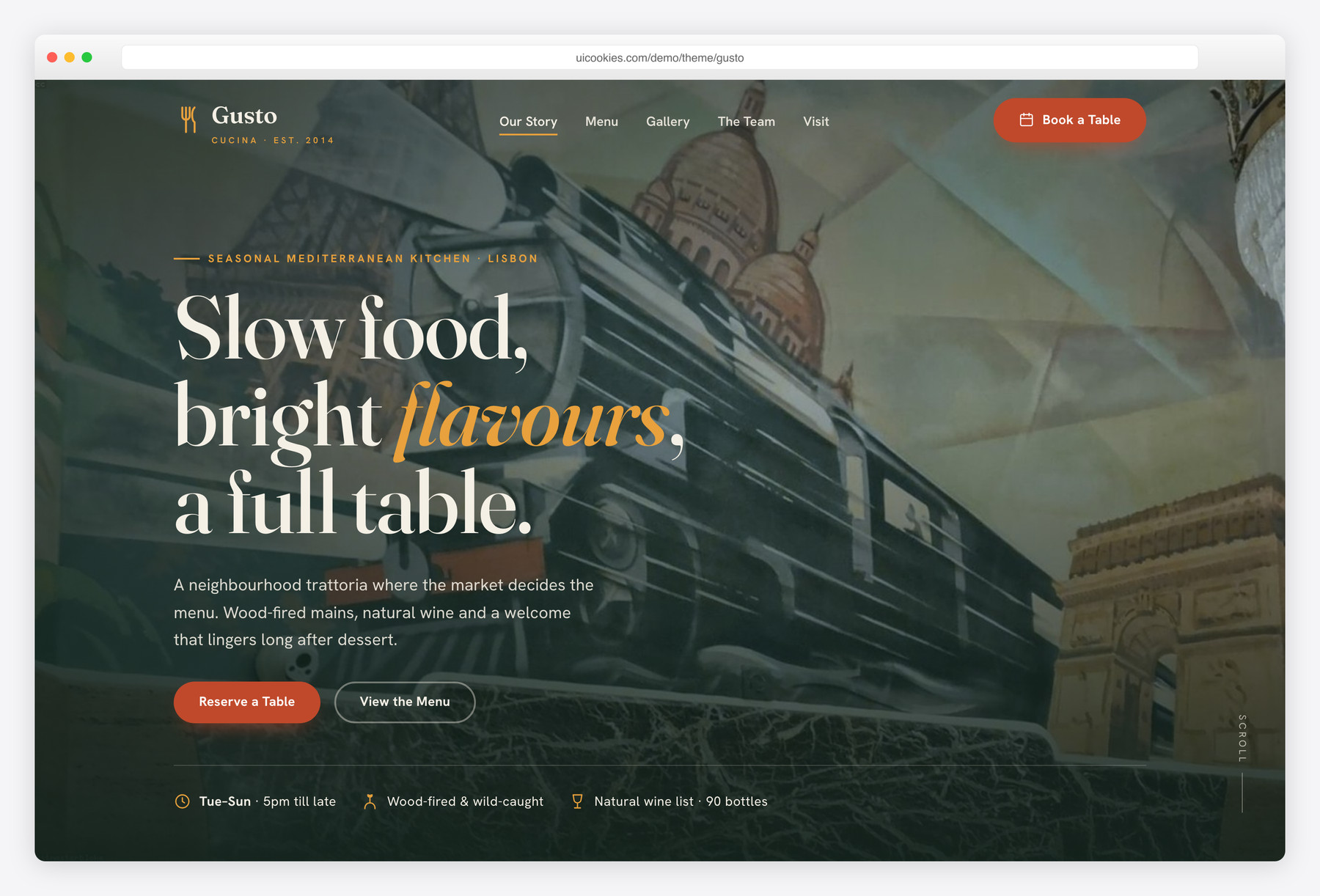
Gusto is a free single-page restaurant and cafe template built on Bootstrap 5 with zero jQuery. It skips the usual cream-and-terracotta look for a moody spruce-green and brass palette that lets your food photography lead, and ships with the pieces a real restaurant needs day one: a tabbed à-la-carte menu and a fully validating reservation form.
Key features
- Printed-menu tabbed layout: Starters, Mains, Desserts, Drinks with dotted price leaders
- Reservation form with real validation: no past dates, email, time, party size
- Chef's pick and vegetarian tags on menu items
- Food gallery with a keyboard-accessible, no-dependency lightbox
- Auto-playing testimonial slider on native scroll-snap, pauses on hover
- Full-height hero with reservation and menu CTAs plus facts strip
- Chef and team cards with hover-reveal social links
- Opening-hours table, stylised CSS location map, and newsletter signup
- Inline SVG icons, sticky header with scrollspy, mobile drawer nav
Best for
- Independent restaurants, cafes and bistros
- Bakeries and bars wanting online reservations
- Menu-and-booking focused single-page sites
- Owners editing plain HTML without a build tool
At a glance
- Framework: Bootstrap 5
- License: Free for personal and commercial use
- Pages: 1 (single-page long-scroll)
- Responsive: Yes
- Style: Warm, moody Mediterranean bistro — spruce green & brass saffron

How to use it
Download the ZIP, unzip it, and open index.html — no build step, nothing to install. Edit the text and images, point any forms at your backend or a form service, and deploy the folder to any static host. Colours and fonts live in css/style.css; the interactions are in js/main.js.
Frequently asked questions
Is Gusto really free to use commercially?
Yes. You can use it for a real restaurant, cafe, bakery or bar, for personal or commercial projects, at no cost. No attribution is required, though a link back to uiCookies is always appreciated.
Do I need to know Bootstrap or a build tool to edit it?
No. It's plain HTML, one CSS file and one vanilla-JS file. Swap the copy and the images in the img/ folder, adjust the colour variables at the top of css/style.css, and you're done. There's no npm install and nothing to compile.
How does the reservation form work?
The form validates entirely in the browser: required fields, email format, no dates in the past, plus time and party-size checks, and it shows an accessible confirmation message. It's a static front end, so it does not receive bookings on its own. To collect reservations, point the form at your booking provider, a form endpoint, or your own script.
Can I change the menu categories or colours?
Absolutely. The menu is a standard Bootstrap 5 tab set, so you can add, remove or rename tabs freely. The whole palette is driven by CSS custom properties at the top of the stylesheet, so switching to a new colour scheme is just a few edits.
Is it responsive and mobile-friendly?
Yes. The layout is fully responsive down to phones, with a dedicated mobile drawer navigation. The tabbed menu, gallery and reservation form all adapt to small screens.
What's actually included in the download?
A single long-scroll page covering the hero, tabbed menu, food gallery, reservation form, chef and team cards, testimonial slider, opening-hours table, a CSS location map and a newsletter signup. It's one HTML file with one CSS file and one JavaScript file, plus the image assets.
Does it use jQuery or icon fonts?
Neither. Gusto is built on Bootstrap 5 with vanilla JavaScript and no jQuery, and every icon is an inline SVG rather than an icon font. Scroll-reveal uses IntersectionObserver and the testimonial slider uses native scroll-snap, so there are no heavy dependencies to load.
How is the menu section built?
It's a printed-menu style tabbed layout split into Starters, Mains, Desserts and Drinks, with dotted price leaders that align each item to its price. Individual dishes can carry Chef's pick or vegetarian tags. Because it's a normal Bootstrap 5 tab set, editing dishes and prices is just editing HTML.