
Summit — Free Corporate & Consulting Website Template
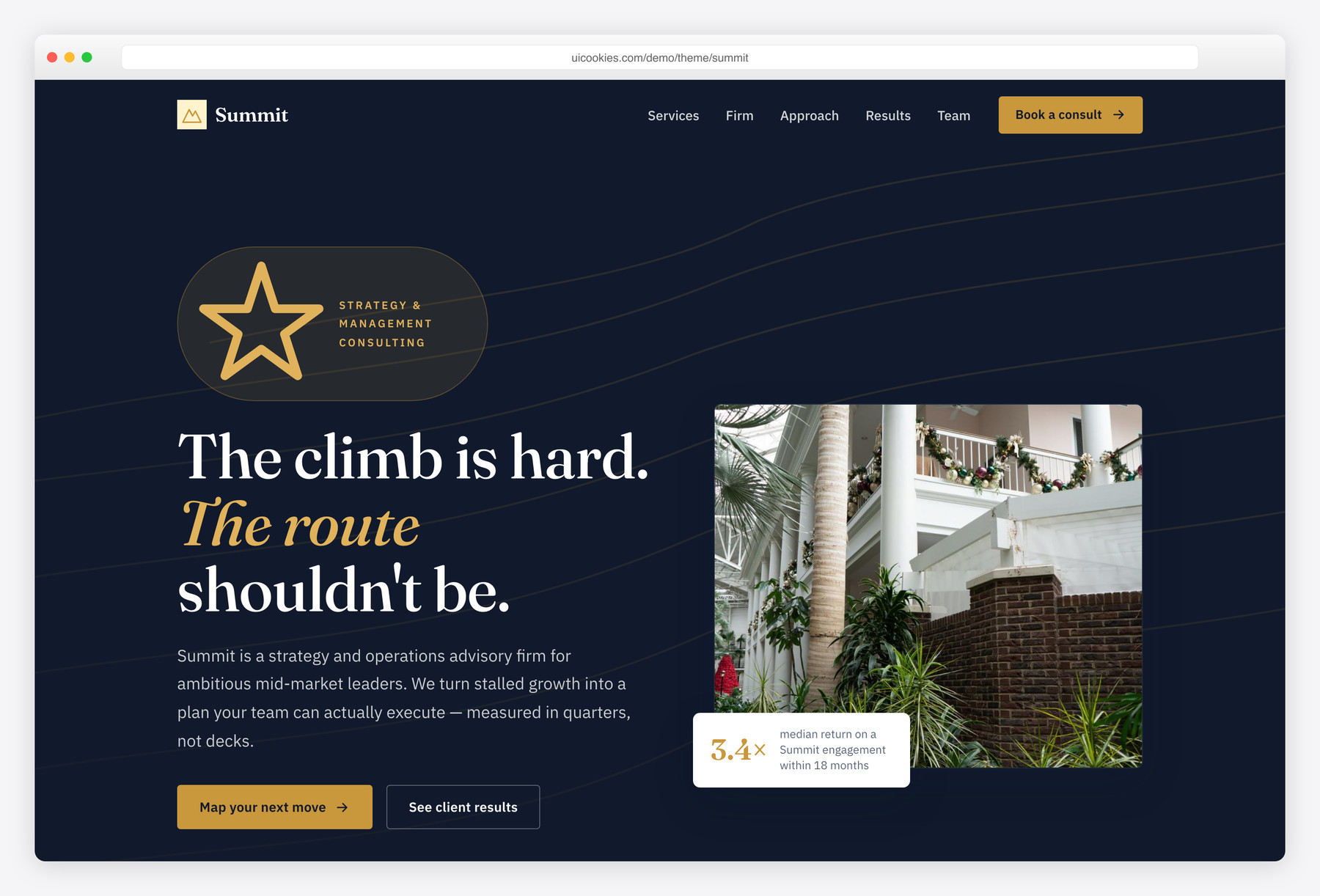
Summit is a free single-page Bootstrap 5 template for strategy and management-consulting firms, styled in deep ink navy with a brass accent and the editorial Fraunces display face instead of the usual blue-on-white consulting look. It runs on zero jQuery — all-vanilla JavaScript in one file plus inline SVG icons — so it deploys clean even on strict-CSP hosts.
Key features
- "Advisory ledger" services layout — numbered rows, hover lift, inline SVG icons
- Animated stat counters that count up on scroll, reduced-motion aware
- Four-stage process section plus partner team profiles
- Case-study cards with swappable headline result metrics
- Vanilla scroll-snap testimonial slider with accessible prev/next controls
- Sticky navy header, full-screen mobile menu and scrollspy
- Front-end validated consultation form with per-field errors and success state
- Hand-drawn topographic contour motif behind the hero — no image weight
- Zero jQuery, all-vanilla JS and inline SVG — clean on strict-CSP hosts
Best for
- Strategy and management-consulting firms
- Boutique advisory and professional-services practices
- Agencies showcasing measurable case-study results
- Corporate one-pagers that need to read premium
At a glance
- Framework: Bootstrap 5
- License: Free for personal and commercial use
- Pages: 1
- Responsive: Yes
- Style: Editorial corporate — ink navy, brass accent, Fraunces + IBM Plex Sans

How to use it
Download the ZIP, unzip it, and open index.html — no build step, nothing to install. Edit the text and images, point any forms at your backend or a form service, and deploy the folder to any static host. Colours and fonts live in css/style.css; the interactions are in js/main.js.
Frequently asked questions
Is Summit really free, including commercial use?
Yes. Summit is free for both personal and commercial projects — use it for a client build, your own firm's website, or a paid product. Attribution is appreciated but never required, and there is nothing to unlock or pay for.
Can I edit it without knowing how to code or using a build tool?
Summit is a plain HTML, CSS and JavaScript template, so there is no build step, no npm install and no framework to learn. Open index.html in any code editor, change the text and images directly, and refresh your browser to see the result. Some basic comfort with HTML helps, but you never need a compiler or the command line.
How do I change the colours and fonts?
All of the theme's colours live in CSS custom properties at the top of css/style.css — variables such as –ink (navy), –brass (the accent) and –marble. Edit those values once and the whole site re-skins. The fonts are two Google Fonts links in the <head> (Fraunces and IBM Plex Sans); swap those to change the typography everywhere.
Is it responsive and mobile-friendly?
Yes. Summit is fully responsive and built on Bootstrap 5's grid, so it reflows cleanly from large desktop monitors down to phones. The navigation collapses into a full-screen mobile menu, and sections like the service ledger, team and case-study cards stack for narrow screens.
Which browsers does it support?
Summit works in all current versions of Chrome, Firefox, Safari and Edge. The JavaScript is written in ES5-safe vanilla code and the layout uses standard Bootstrap 5 and CSS, so there are no exotic dependencies. The scroll animations also respect the prefers-reduced-motion setting for users who opt out.
Does the consultation form actually send email?
The form is fully styled with real front-end validation — per-field error messages, an email pattern check and a success state — but it does not send email on its own. Summit is a static front-end, so to receive submissions you point the form's action at a service like Formspree or Netlify Forms, or wire it to your own backend endpoint. There is no payment processing or database included.
Does it use jQuery or icon fonts?
No jQuery and no icon fonts. Every script is vanilla JavaScript in a single file and every icon is inline SVG, so the template deploys cleanly on strict-CSP hosts with no blocked font or script requests. The hero's topographic "summit" contour motif is drawn in the markup rather than loaded as an image, which keeps page weight low and avoids CDN calls.
What is the "advisory ledger" and can I swap in my own numbers?
It is Summit's signature services section — a set of numbered rows, each with a practice name, short description and an inline SVG icon, that lift on hover instead of the usual card grid. Both the ledger and the animated stat counters (which count up as they scroll into view) are plain HTML, so you edit the labels, descriptions and figures directly in index.html. No config file or JavaScript changes are needed to use your own content.