Open demo

CSS code

HTML
<ol class="steps">
  <li class="done"><span class="dot" aria-hidden="true">✓</span><h2>Cart <span class="sr-only">(completed)</span></h2><p>3 items</p></li>
  <li class="done"><span class="dot" aria-hidden="true">✓</span><h2>Shipping <span class="sr-only">(completed)</span></h2><p>Express, 2 days</p></li>
  <li class="cur" aria-current="step"><span class="dot" aria-hidden="true">3</span><h2>Payment <span class="sr-only">(current step)</span></h2><p>In progress</p></li>
  <li class="todo"><span class="dot" aria-hidden="true">4</span><h2>Review</h2><p>Confirm order</p></li>
  <li class="todo"><span class="dot" aria-hidden="true">5</span><h2>Done</h2><p>Receipt by email</p></li>
</ol>
CSS
/* Horizontal step timeline: each step draws its own segment of the line, so the bar fills up to the current step.
   Stacks vertically under 640px. Step state is announced through visually hidden text and aria-current. */
.steps{--st-accent:#4f46e5;--st-line:#dde3f0;--st-muted:#5e6a85;--st-todo:#687390;
  display:flex;width:100%;max-width:820px;margin:0;padding:0;list-style:none}
.steps>li{flex:1;position:relative;text-align:center;padding-top:34px}
.steps>li::before{content:"";position:absolute;top:11px;left:0;right:0;height:4px;background:var(--st-line)}
.steps>li:first-child::before{left:50%}
.steps>li:last-child::before{right:50%}
.steps>.done::before{background:var(--st-accent)}
.steps>.cur::before{background:linear-gradient(90deg,var(--st-accent) 50%,var(--st-line) 50%)}
.steps .dot{position:absolute;top:0;left:50%;transform:translateX(-50%);box-sizing:border-box;width:26px;height:26px;border-radius:50%;
  display:flex;align-items:center;justify-content:center;font-size:.72rem;font-weight:900;z-index:1}
.steps .done .dot{background:var(--st-accent);color:#fff}
.steps .cur .dot{background:#fff;color:var(--st-accent);border:3px solid var(--st-accent);box-shadow:0 0 0 5px rgba(79,70,229,.15)}
.steps .todo .dot{background:#fff;color:var(--st-todo);border:3px solid var(--st-line)}
.steps h2{margin:0 0 3px;font-size:.88rem}
.steps .todo h2{color:var(--st-muted)}
.steps p{margin:0;font-size:.76rem;color:var(--st-muted)}
.sr-only{position:absolute;width:1px;height:1px;padding:0;margin:-1px;overflow:hidden;clip:rect(0,0,0,0);white-space:nowrap;border:0}
@media (max-width:640px){
  .steps{flex-direction:column;max-width:320px}
  .steps>li{text-align:left;padding:0 0 34px 44px}
  .steps>li::before,.steps>li:first-child::before,.steps>li:last-child::before{top:0;bottom:0;left:11px;right:auto;width:4px;height:auto}
  .steps>li:first-child::before{top:13px}
  .steps>li:last-child::before{bottom:auto;height:13px}
  .steps>.cur::before{background:linear-gradient(180deg,var(--st-accent) 13px,var(--st-line) 13px)}
  .steps .dot{left:0;transform:none}
}

Bootstrap 5 code

Requires: Bootstrap 5.3.8 CSS

HTML
<ol class="steps d-flex list-unstyled mb-0">
  <li class="done"><span class="dot rounded-circle d-flex align-items-center justify-content-center" aria-hidden="true">✓</span><h2 class="fw-bold">Cart <span class="visually-hidden">(completed)</span></h2><p class="mb-0">3 items</p></li>
  <li class="done"><span class="dot rounded-circle d-flex align-items-center justify-content-center" aria-hidden="true">✓</span><h2 class="fw-bold">Shipping <span class="visually-hidden">(completed)</span></h2><p class="mb-0">Express, 2 days</p></li>
  <li class="cur" aria-current="step"><span class="dot rounded-circle d-flex align-items-center justify-content-center" aria-hidden="true">3</span><h2 class="fw-bold">Payment <span class="visually-hidden">(current step)</span></h2><p class="mb-0">In progress</p></li>
  <li class="todo"><span class="dot rounded-circle d-flex align-items-center justify-content-center" aria-hidden="true">4</span><h2 class="fw-bold">Review</h2><p class="mb-0">Confirm order</p></li>
  <li class="todo"><span class="dot rounded-circle d-flex align-items-center justify-content-center" aria-hidden="true">5</span><h2 class="fw-bold">Done</h2><p class="mb-0">Receipt by email</p></li>
</ol>
CSS
/* Horizontal step timeline on a .list-unstyled flex list: each step draws its own segment of the line,
   so the bar fills up to the current step. Stacks vertically under 640px. State is in .visually-hidden text. */
.steps{--st-accent:#4f46e5;--st-line:#dde3f0;--st-muted:#5e6a85;--st-todo:#687390;width:100%;max-width:820px}
.steps>li{flex:1;position:relative;text-align:center;padding-top:34px}
.steps>li::before{content:"";position:absolute;top:11px;left:0;right:0;height:4px;background:var(--st-line)}
.steps>li:first-child::before{left:50%}
.steps>li:last-child::before{right:50%}
.steps>.done::before{background:var(--st-accent)}
.steps>.cur::before{background:linear-gradient(90deg,var(--st-accent) 50%,var(--st-line) 50%)}
.steps .dot{position:absolute;top:0;left:50%;transform:translateX(-50%);width:26px;height:26px;font-size:.72rem;font-weight:900;z-index:1}
.steps .done .dot{background:var(--st-accent);color:#fff}
.steps .cur .dot{background:#fff;color:var(--st-accent);border:3px solid var(--st-accent);box-shadow:0 0 0 5px rgba(79,70,229,.15)}
.steps .todo .dot{background:#fff;color:var(--st-todo);border:3px solid var(--st-line)}
.steps h2{margin:0 0 3px;font-size:.88rem;line-height:normal}
.steps .todo h2{color:var(--st-muted)}
.steps p{font-size:.76rem;color:var(--st-muted)}
@media (max-width:640px){
  .steps{flex-direction:column;max-width:320px}
  .steps>li{text-align:left;padding:0 0 34px 44px}
  .steps>li::before,.steps>li:first-child::before,.steps>li:last-child::before{top:0;bottom:0;left:11px;right:auto;width:4px;height:auto}
  .steps>li:first-child::before{top:13px}
  .steps>li:last-child::before{bottom:auto;height:13px}
  .steps>.cur::before{background:linear-gradient(180deg,var(--st-accent) 13px,var(--st-line) 13px)}
  .steps .dot{left:0;transform:none}
}

Tailwind 4 code

Requires: Tailwind CSS 4

HTML
<ol class="flex w-full max-w-[320px] flex-col min-[641px]:max-w-[820px] min-[641px]:flex-row">
  <li class="relative flex-1 pb-[34px] pl-11 before:absolute before:top-[13px] before:bottom-0 before:left-[11px] before:w-1 before:bg-[#4f46e5] min-[641px]:pt-[34px] min-[641px]:pb-0 min-[641px]:pl-0 min-[641px]:text-center min-[641px]:before:top-[11px] min-[641px]:before:right-0 min-[641px]:before:bottom-auto min-[641px]:before:left-1/2 min-[641px]:before:h-1 min-[641px]:before:w-auto"><span aria-hidden="true" class="absolute top-0 left-0 z-[1] flex size-[26px] items-center justify-center rounded-full bg-[#4f46e5] text-[.72rem] font-black text-white min-[641px]:left-1/2 min-[641px]:-translate-x-1/2">✓</span><h2 class="mb-[3px] text-[.88rem] font-bold">Cart <span class="sr-only">(completed)</span></h2><p class="text-[.76rem] text-[#5e6a85]">3 items</p></li>
  <li class="relative flex-1 pb-[34px] pl-11 before:absolute before:inset-y-0 before:left-[11px] before:w-1 before:bg-[#4f46e5] min-[641px]:pt-[34px] min-[641px]:pb-0 min-[641px]:pl-0 min-[641px]:text-center min-[641px]:before:top-[11px] min-[641px]:before:right-0 min-[641px]:before:bottom-auto min-[641px]:before:left-0 min-[641px]:before:h-1 min-[641px]:before:w-auto"><span aria-hidden="true" class="absolute top-0 left-0 z-[1] flex size-[26px] items-center justify-center rounded-full bg-[#4f46e5] text-[.72rem] font-black text-white min-[641px]:left-1/2 min-[641px]:-translate-x-1/2">✓</span><h2 class="mb-[3px] text-[.88rem] font-bold">Shipping <span class="sr-only">(completed)</span></h2><p class="text-[.76rem] text-[#5e6a85]">Express, 2 days</p></li>
  <li aria-current="step" class="relative flex-1 pb-[34px] pl-11 before:absolute before:inset-y-0 before:left-[11px] before:w-1 before:bg-[linear-gradient(180deg,#4f46e5_13px,#dde3f0_13px)] min-[641px]:pt-[34px] min-[641px]:pb-0 min-[641px]:pl-0 min-[641px]:text-center min-[641px]:before:top-[11px] min-[641px]:before:right-0 min-[641px]:before:bottom-auto min-[641px]:before:left-0 min-[641px]:before:h-1 min-[641px]:before:w-auto min-[641px]:before:bg-[linear-gradient(90deg,#4f46e5_50%,#dde3f0_50%)]"><span aria-hidden="true" class="absolute top-0 left-0 z-[1] flex size-[26px] items-center justify-center rounded-full border-3 border-[#4f46e5] bg-white text-[.72rem] font-black text-[#4f46e5] shadow-[0_0_0_5px_rgba(79,70,229,.15)] min-[641px]:left-1/2 min-[641px]:-translate-x-1/2">3</span><h2 class="mb-[3px] text-[.88rem] font-bold">Payment <span class="sr-only">(current step)</span></h2><p class="text-[.76rem] text-[#5e6a85]">In progress</p></li>
  <li class="relative flex-1 pb-[34px] pl-11 before:absolute before:inset-y-0 before:left-[11px] before:w-1 before:bg-[#dde3f0] min-[641px]:pt-[34px] min-[641px]:pb-0 min-[641px]:pl-0 min-[641px]:text-center min-[641px]:before:top-[11px] min-[641px]:before:right-0 min-[641px]:before:bottom-auto min-[641px]:before:left-0 min-[641px]:before:h-1 min-[641px]:before:w-auto"><span aria-hidden="true" class="absolute top-0 left-0 z-[1] flex size-[26px] items-center justify-center rounded-full border-3 border-[#dde3f0] bg-white text-[.72rem] font-black text-[#687390] min-[641px]:left-1/2 min-[641px]:-translate-x-1/2">4</span><h2 class="mb-[3px] text-[.88rem] font-bold text-[#5e6a85]">Review</h2><p class="text-[.76rem] text-[#5e6a85]">Confirm order</p></li>
  <li class="relative flex-1 pb-[34px] pl-11 before:absolute before:top-0 before:left-[11px] before:h-[13px] before:w-1 before:bg-[#dde3f0] min-[641px]:pt-[34px] min-[641px]:pb-0 min-[641px]:pl-0 min-[641px]:text-center min-[641px]:before:top-[11px] min-[641px]:before:right-1/2 min-[641px]:before:left-0 min-[641px]:before:h-1 min-[641px]:before:w-auto"><span aria-hidden="true" class="absolute top-0 left-0 z-[1] flex size-[26px] items-center justify-center rounded-full border-3 border-[#dde3f0] bg-white text-[.72rem] font-black text-[#687390] min-[641px]:left-1/2 min-[641px]:-translate-x-1/2">5</span><h2 class="mb-[3px] text-[.88rem] font-bold text-[#5e6a85]">Done</h2><p class="text-[.76rem] text-[#5e6a85]">Receipt by email</p></li>
</ol>

About this set

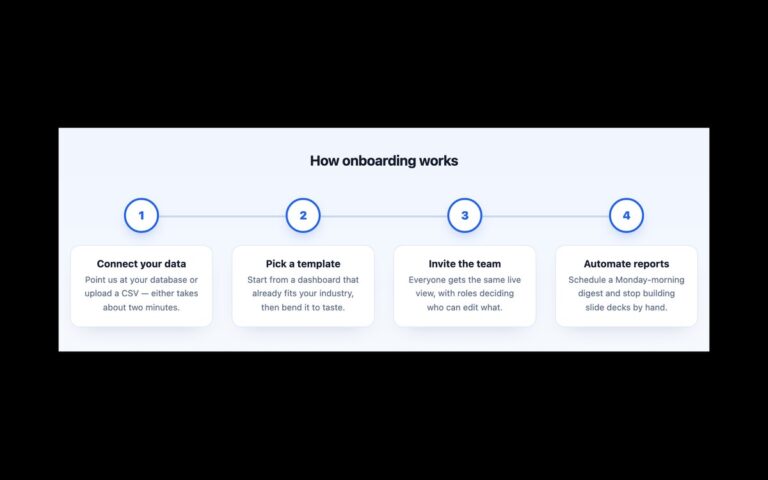
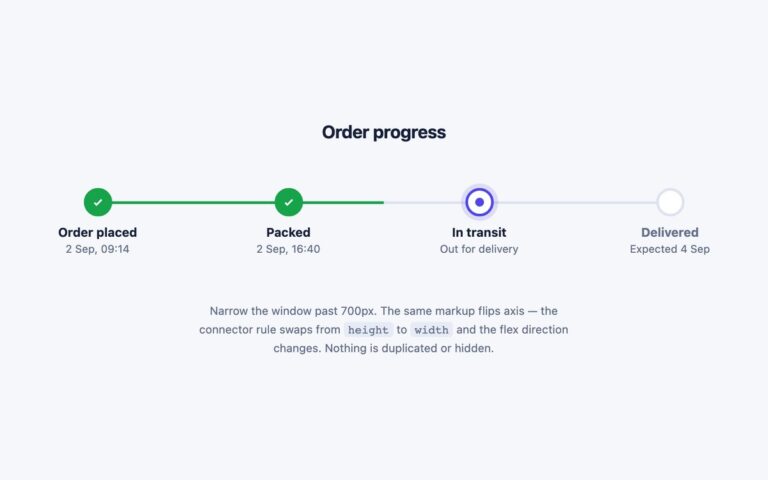
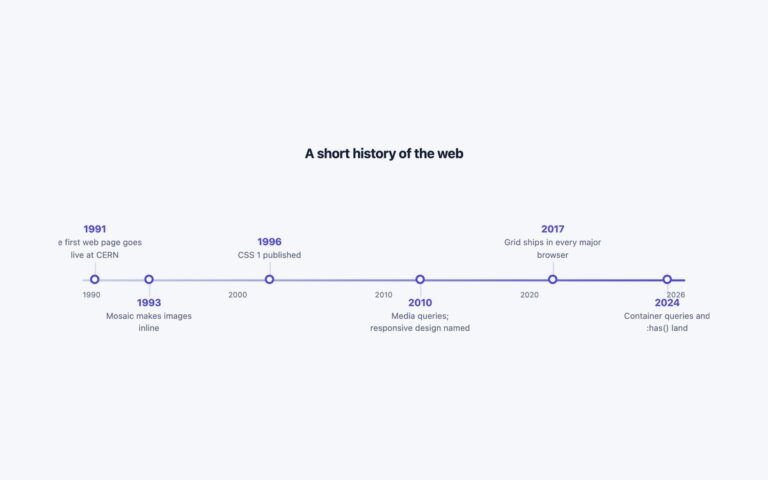
A horizontal step timeline for order progress: Cart, Shipping, Payment, Review and Done, each with a circle and a short caption. Completed steps show an indigo tick, the current step has a white circle with an indigo ring and halo, and future steps are numbered grey circles. Each step draws its own segment of the connecting bar, so the bar is indigo up to the current step and grey after it, and the current segment is half and half. Use it at the top of a checkout, an onboarding flow, a shipping tracker or any multi-step form. The steps are an ordered list. The current one has aria-current=”step”, and completed and current steps carry visually hidden text, so a screen reader hears Cart completed and Payment current step rather than relying on colour. Under 640 pixels the row turns into a vertical list with the bar on the left, and the bar now starts and stops at the centre of the first and last circles. The Bootstrap version uses .d-flex, .rounded-circle and .visually-hidden, and the Tailwind version builds the two layouts with a min-[641px]: breakpoint.

What’s included

  • Completed, current and upcoming states with a filling bar
  • Current step marked with aria-current="step"
  • Visually hidden completed and current-step text
  • Stacks into a vertical list under 640px
  • Upcoming step text darkened to pass 4.5:1

Accessibility

The steps form an ordered list, and the current step has aria-current="step". Hidden text after the step name says completed or current step, so state is not given by colour alone. The circles are aria-hidden. Upcoming labels and captions were darkened to #5e6a85 so they reach 5:1. There is no animation.

Customise it

Change --st-accent, --st-line, --st-muted and --st-todo on .steps (plain CSS and Bootstrap). The 640px media query sets where it stacks. In Tailwind edit the #4f46e5 and #dde3f0 values and the min-[641px]: prefix.