
Abacus — Free Accounting & Invoicing SaaS Website Template
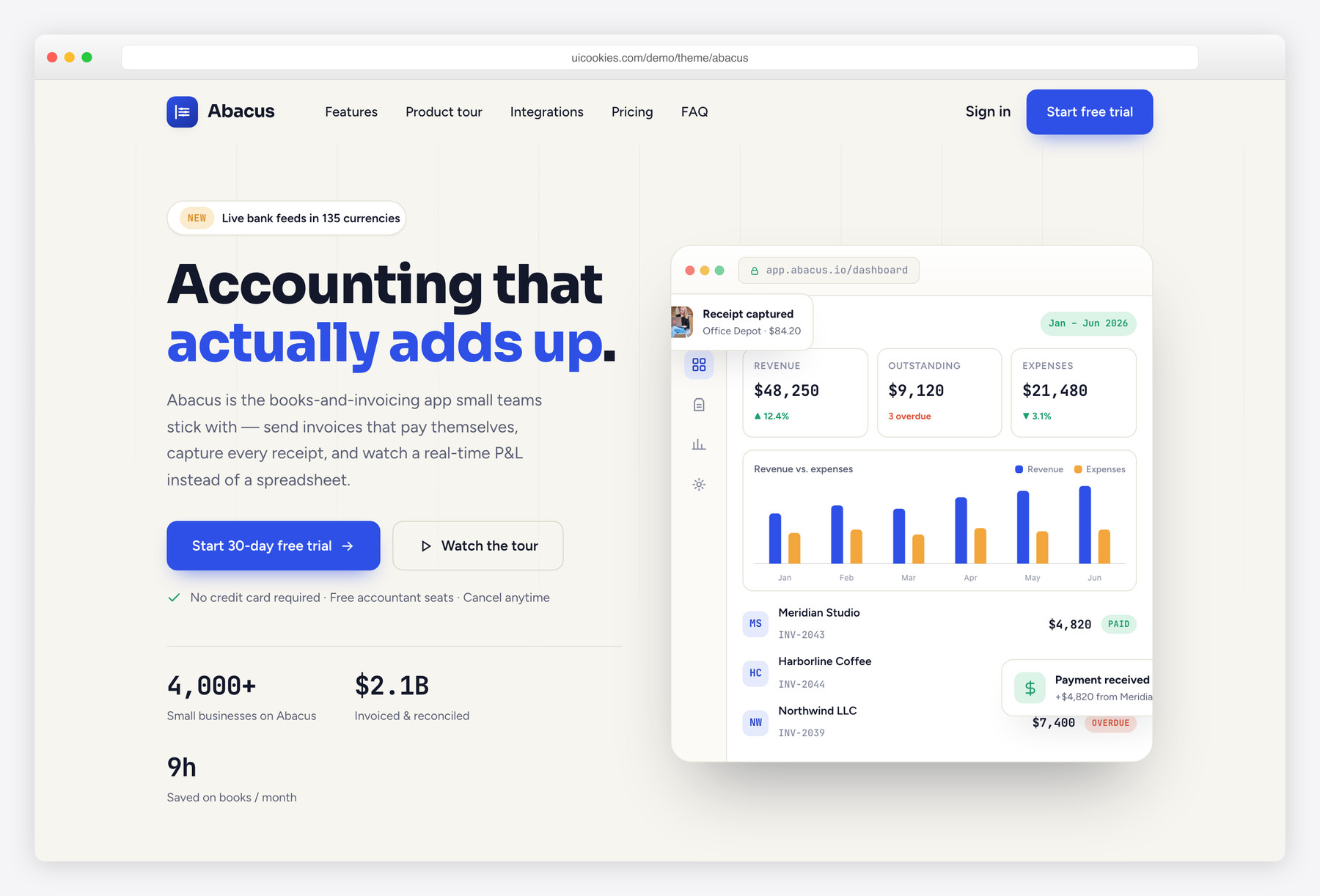
Abacus is a free single-page Bootstrap 5 landing template for a small-business accounting and invoicing SaaS, built with vanilla JavaScript and zero jQuery. Its standout is a live dashboard mock — a CSS-built app window with stat tiles, an invoice list, and a Chart.js revenue-vs-expenses chart — that makes the product feel real above the fold with no image editing. A tabbed product tour and a working monthly/annual pricing toggle round out a credible B2B finance look in cobalt and marigold on warm-oat paper.
Key features
- Live dashboard hero mock built in CSS with a Chart.js revenue-vs-expenses chart
- Tabbed product tour (Invoicing / Expenses / Reports) with keyboard-navigable ARIA tabs
- Three-tier pricing block with a working monthly ↔ annual toggle that rewrites prices
- Animated trust-stat counters (prefix/suffix/decimal aware) that count up on scroll
- Integrations grid plus a benefits column for payment, payroll, and banking logos
- Six-card feature grid, testimonials with avatars, and a native details/summary FAQ
- Full-bleed CTA band with front-end email validation and a SOC 2 trust line
- Hand-drawn inline SVG icons (no icon fonts, CSP-safe) with JetBrains Mono figures
- Plain Bootstrap 5 and vanilla JavaScript throughout, zero jQuery
Best for
- Accounting, invoicing, and bookkeeping SaaS products
- Small-business B2B fintech and finance tools
- Founders launching a single-page product site
- A credible dashboard hero without any design work
- Agencies building finance client landing pages fast
At a glance
- Framework: Bootstrap 5
- License: Free for personal and commercial use
- Pages: 1
- Responsive: Yes
- Style: Clean B2B SaaS — cobalt & marigold on warm-oat paper, columnar-ledger motif

How to use it
Download the ZIP, unzip it, and open index.html — no build step, nothing to install. Edit the text and images, point any forms at your backend or a form service, and deploy the folder to any static host. Colours and fonts live in css/style.css; the interactions are in js/main.js.
Frequently asked questions
Is Abacus free to use, including for commercial projects?
Yes. Abacus is free for both personal and commercial use, so you can ship it for your own SaaS or a paying client. It is a static front-end template, meaning you get the HTML, CSS, and JavaScript to host wherever you like. There are no licensing fees or usage limits on the template itself.
Do I need coding skills or a build tool to edit it?
No build step is required. Abacus is a single static HTML page with plain CSS and vanilla JavaScript, so there is no npm install, no bundler, and no framework to learn. You can open the files in any code editor, change the text and images directly in the markup, and preview by opening the page in a browser. Basic HTML familiarity is enough to make it yours.
How do I change the colours and fonts?
The cobalt-blue, marigold, and warm-oat paper palette is defined once at the top of the stylesheet, so recolouring the whole page is a matter of editing a few values rather than hunting through every rule. Numeric figures use JetBrains Mono for a ledger feel, loaded via a standard font link you can swap for another family. Adjust those two places and the change propagates across the hero, pricing, and dashboard mock.
Is the template responsive and mobile-friendly?
Yes. Abacus is built on the Bootstrap 5 grid and is fully responsive, so the hero dashboard, tabbed tour, pricing tiers, and feature grid reflow cleanly down to phone widths. It has been laid out mobile-first, and the interactive pieces like the pricing toggle and tabs work with touch. No extra configuration is needed for smaller screens.
Do the forms actually send anything, or connect to a backend?
No. Abacus is a static front end with no server code, so the CTA email field only runs client-side validation and does not deliver messages anywhere on its own. To make it functional, point the form's action at your own handler, mailing service, or form endpoint. Likewise there is no payment processing — the pricing block is presentational and would connect to your billing provider separately.
Is the dashboard in the hero a real, working dashboard?
It is a convincing mock rather than a live app. The window frame, stat tiles, and invoice list are built in CSS, and the revenue-vs-expenses chart is rendered with Chart.js from static sample data in the page. This is the template's headline feature because it looks like a real product above the fold with no screenshot or image editing. You can edit the numbers and chart data directly in the HTML and JavaScript.
How do the pricing toggle and counters work?
Both are handled in vanilla JavaScript with no dependencies beyond the page itself. The monthly-to-annual switch rewrites the displayed prices and the billed-yearly notes on click, and the trust-stat counters animate up when they scroll into view, respecting any prefix, suffix, or decimal you set. You change the underlying values in the markup, and the scripts handle the interaction.
What about performance, images, and browser support?
Icons are hand-drawn inline SVGs instead of an icon font, which keeps requests down and stays CSP-safe, and the browser-framed screenshots in the product tour are the main images you would swap for your own. Chart.js is the primary third-party dependency. The template targets modern evergreen browsers and, because it uses vanilla JavaScript with no jQuery, it stays lightweight and easy to maintain.