
Fernhill — Free Landscaping Website Template
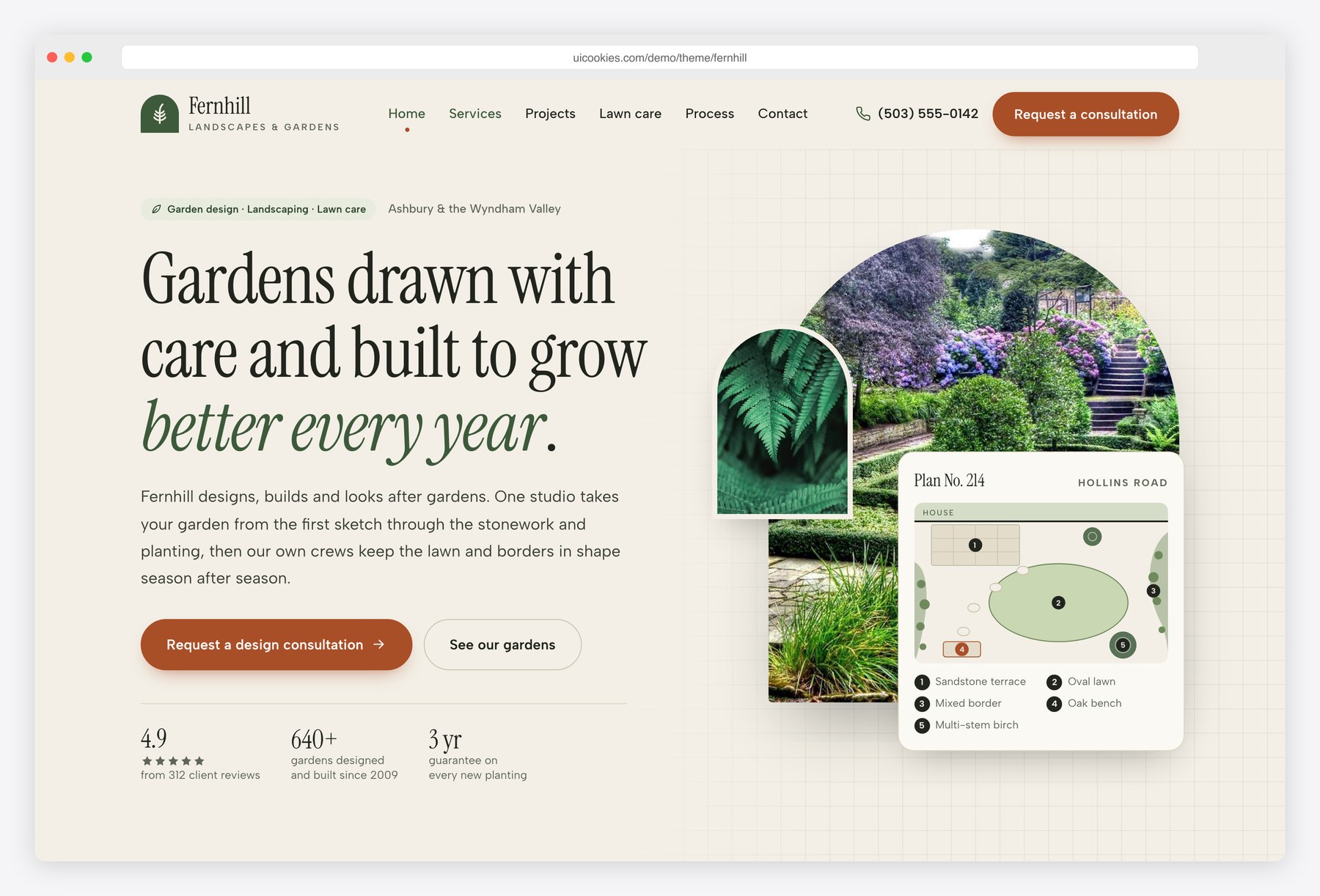
Fernhill gives a landscaping company a calm, drawn-by-hand look: limestone paper, fern green, loam and terracotta, with Instrument Serif headings, arch-topped photos and a drafting-grid background. The hero carries a small garden plan drawn in SVG, and the process runs along a dashed garden path. Visitors can filter past projects and drag a before and after slider, see which lawn treatments each plan includes month by month, price a plan for their lawn size and send a full design brief with photos.
Key features
- Project portfolio with filter buttons by type (garden design, hardscaping, planting, lawn care), live counts and a native dialog for each project’s details
- Before and after slider that works by dragging, by arrow keys on a native range input, or with Before, Half and After buttons
- Lawn care visit calendar: a twelve-month table of treatments that greys out what each of the three plans leaves out and highlights the current month
- Lawn plan price calculator by lawn size in square feet, with a slider, presets, plan choice, extras and per-visit, yearly and monthly totals
- Consultation request form with garden size and budget cards, illustrated style checkbox cards, drag-and-drop photo upload with previews and in-browser validation
- Home page with a hand-drawn SVG garden plan in the hero, a numbered services index, featured projects and a five-step process from consultation to aftercare
- Reviews with initials avatars, a rating breakdown and a native details FAQ
- Contact page with a service area map drawn in SVG, a copy-address button and opening hours with a live open or closed status
- All content visible without JavaScript; animations respect prefers-reduced-motion
Best for
- Landscaping and garden design companies
- Lawn care and lawn treatment services
- Hardscaping, patio and paving contractors
- Garden maintenance crews offering seasonal plans
At a glance
- Bootstrap 5.3.8 with vanilla JavaScript, no jQuery
- 5 pages: index.html, projects.html, lawn-care.html, quote.html, contact.html
- Palette and fonts set as CSS custom properties in css/style.css
- Instrument Serif headings with Albert Sans body text
- Inline SVG icons, garden plan, style illustrations and service area map; no icon fonts or chart libraries
- Free for personal and commercial use; attribution optional but welcome. Full terms: uicookies.com/license
How to use it
Unzip the folder and open index.html in a browser. Edit the copy in the five HTML files and replace the photos in img/ with your own. Colours and fonts are CSS custom properties at the top of css/style.css. Lawn plan prices, extras and opening hours sit at the top of js/main.js. The forms validate in the browser and send nothing, so connect a form service or your own backend, then upload the folder to any static host.
Frequently asked questions
Is Fernhill free for a landscaping business or client site?
Yes. Fernhill is free for personal and commercial use, including a live company website or a client build. Attribution to uiCookies is optional but always welcome, and the full terms are on the uiCookies license page.
What is Fernhill built with?
Fernhill uses Bootstrap 5.3.8, self-hosted, and one vanilla JavaScript file with no jQuery or other libraries. Icons, the garden plan, the style illustrations and the service area map are inline SVG, and every section stays readable with JavaScript turned off.
Which pages are included?
There are five pages: a home page with services, featured projects, process, reviews and FAQ; a projects page with a before and after slider and a filterable portfolio; a lawn care page with plans, a visit calendar and a price calculator; a consultation request page; and a contact page.
How do I change the lawn care prices?
The price per visit is a base charge plus a rate per square foot, with a discount for each plan, and every extra has its own small formula. All of these sit in one LAWN object at the top of js/main.js, so changing a number updates the calculator straight away.
Do the quote and contact forms send email?
No. Both forms check the answers in the browser, keep uploaded photos in the page for preview and then show a confirmation with a summary, but nothing is sent. Connect them to a form service or your own backend before going live.