
Parcel — Free Single Luxury Property Website Template
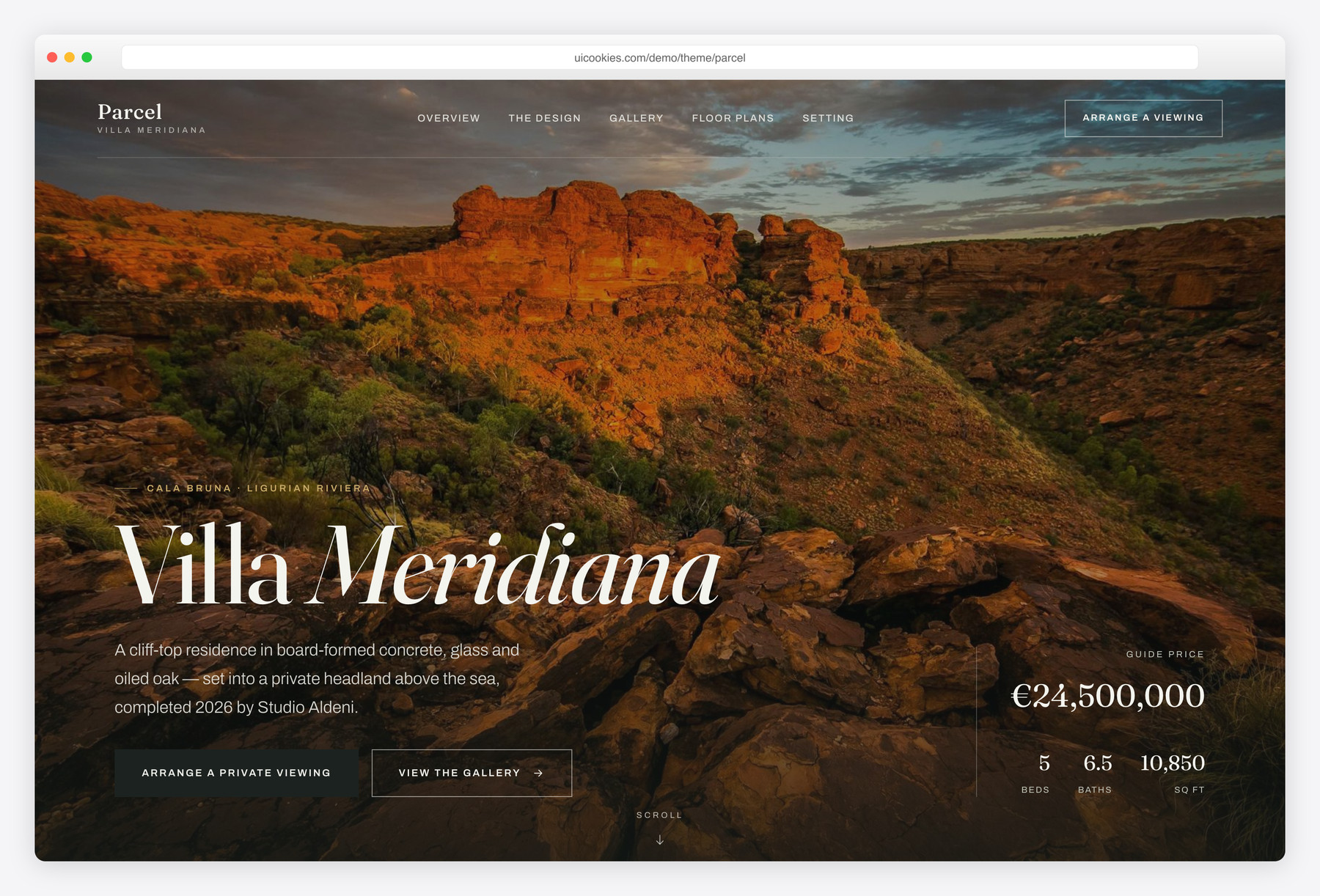
Parcel is a free, single-page Bootstrap 5 template built for one trophy property — not a whole portal. Its standout is an interactive floor-plan explorer drawn entirely as inline SVG (no image files), sitting alongside a cinematic full-bleed hero, a lightbox gallery and a private-viewing request form. Self-hosted Bootstrap 5 and hand-written vanilla JavaScript mean it deploys clean on a strict-CSP host.
Key features
- Interactive floor-plan explorer with tabbed levels as inline SVG
- Cinematic full-bleed hero with guide price and key stats
- Lightbox gallery with keyboard nav, counter and focus trap
- Private-viewing request form with front-end validation
- "At a glance" stat band plus beds, baths and area spec list
- Neighbourhood section with locale cards and drive-times table
- Dark "The Design" editorial split with architect sign-off
- Inline-SVG icons throughout — no icon fonts, no jQuery
- Accessible by default: skip link, ARIA, :focus-visible, reduced-motion
Best for
- Marketing one high-end or luxury property
- Estate agents listing a single trophy home
- Architect-designed or new-build showcase pages
- Villa, estate or coastal-property landing pages
- Strict-CSP hosts needing a clean, script-light build
At a glance
- Framework: Bootstrap 5
- License: Free for personal and commercial use
- Pages: 1 (single-page)
- Responsive: Yes
- Style: Architectural luxury real estate — limestone, basalt & brass, Fraunces + Archivo

How to use it
Download the ZIP, unzip it, and open index.html — no build step, nothing to install. Edit the text and images, point any forms at your backend or a form service, and deploy the folder to any static host. Colours and fonts live in css/style.css; the interactions are in js/main.js.
Frequently asked questions
Is Parcel free to use, including commercially?
Yes. Parcel is free for both personal and commercial projects, so you can use it for a real client listing without a licence fee. You are free to edit the markup, styles and content to fit your own property.
Is it really just one page?
Yes. Parcel is a single long-scroll landing page for one property, covering the hero, overview, the design story, gallery, floor plans, features, the neighbourhood and an enquiry section — all in one file. There is no secondary page to wire up, which keeps it fast to launch and easy to maintain.
Can I edit it without a build tool or knowing much code?
Yes. Everything lives in a plain index.html with a single css/style.css, so there is no build step, compiler or framework to install. You edit the copy directly in the HTML and open the file in any browser to preview your changes.
How do the floor plans work — do they need image files?
No. Each level is drawn as inline SVG directly in the markup, so the plans stay razor-sharp at any size, weigh almost nothing and never break on a strict-CSP host. To adapt them to your own property, edit the room rectangles and labels in the SVG, and the live room legend updates alongside the tabbed levels.
How do I change the colours and fonts?
The whole palette is driven by CSS custom properties at the top of css/style.css, so changing a few variables re-skins the entire template — the limestone, basalt and antique-brass scheme is all in one place. The type pairing is Fraunces for headings and Archivo for body text, which you can swap in the same stylesheet and font links.
Is it responsive and mobile-friendly?
Yes. Parcel is fully responsive and adapts from large desktop screens down to phones, including a full-screen mobile menu. It is built on Bootstrap 5, so the grid and layout behave predictably across devices and modern browsers.
How do I make the viewing request form actually send?
The form is front-end only: it has real client-side validation and status messaging but does not process or store submissions on its own. To receive enquiries, point its action attribute at your own backend, a form service like Formspree or Basin, or your CRM. Note that Parcel is a static front-end and does not include payment processing or a database.
How do I add my own property photos to the gallery?
Swap the images in the img/ folder and update the file paths in index.html. The lightbox reads each tile's data-title, data-cat and data-caption attributes, so new images drop straight in with their own captions and category labels — no JavaScript changes needed. Use appropriately compressed images to keep the cinematic hero and gallery loading quickly.