Open demo

CSS code

HTML
<div class="grid2">
<div><span class="lbl">Custom arrow</span>
<div class="f">
<label for="s1">Project type</label>
<div class="sel"><select id="s1" name="type">
<option>Marketing site</option><option>Web application</option><option>Online store</option>
</select></div>
</div>
</div>
<div><span class="lbl">Multiple</span>
<div class="f">
<label for="s2">Technologies</label>
<select id="s2" name="tech" multiple size="4" aria-describedby="s2-hint">
<option selected>HTML & CSS</option><option selected>Bootstrap</option>
<option>Tailwind</option><option>Sass</option></select>
<small id="s2-hint">Hold Ctrl (⌘ on a Mac) to choose more than one.</small>
</div>
</div>
</div>
<div><span class="lbl">Textarea</span>
<div class="f">
<label for="s3">Project brief</label>
<textarea id="s3" name="brief" placeholder="What are you building, and what does done look like?"></textarea>
</div>
</div>
<div><span class="lbl">With a counter</span>
<div class="f">
<label for="s4">Short bio</label>
<textarea id="s4" name="bio" maxlength="160" aria-describedby="s4-hint s4-count" data-count="s4-count">Designer and front-end developer, mostly working on tools that other people have to live inside.</textarea>
<div class="count"><span id="s4-hint">Keep it brief.</span><span id="s4-count"><span data-n>96</span> / 160<span class="sr-only"> characters</span></span></div>
</div>
</div>
CSS
/* Selects and textareas: a native <select> with a drawn arrow, a multiple select, a resizable
   textarea and one with a live character counter. */
.f{--f-text:#0f172a;--f-label:#334155;--f-hint:#64748b;--f-bg:#fff;--f-border:#8492a6;--f-focus:#2563eb;
  --f-ring:#dbeafe;--f-radius:9px;display:flex;flex-direction:column;gap:7px;max-width:360px}
.f label{font-size:.82rem;font-weight:600;color:var(--f-label)}
.f select,.f textarea{box-sizing:border-box;width:100%;font:inherit;font-size:.92rem;padding:11px 14px;color:var(--f-text);
  background:var(--f-bg);border:1px solid var(--f-border);border-radius:var(--f-radius);transition:border-color .16s,box-shadow .16s}
.f select:focus,.f textarea:focus{outline:0;border-color:var(--f-focus);box-shadow:0 0 0 3px var(--f-ring)}
.f textarea::placeholder{color:var(--f-hint)}
.f small{font-size:.76rem;color:var(--f-hint)}
.sr-only{position:absolute;width:1px;height:1px;padding:0;margin:-1px;overflow:hidden;clip:rect(0,0,0,0);white-space:nowrap;border:0}
/* custom arrow: the native arrow is removed and a rotated border square drawn in its place */
.sel{position:relative}
.sel select{appearance:none;-webkit-appearance:none;padding-right:40px;cursor:pointer}
.sel::after{content:"";box-sizing:border-box;position:absolute;right:16px;top:calc(50% - 7px);width:8px;height:8px;
  border-right:2px solid var(--f-hint);border-bottom:2px solid var(--f-hint);transform:rotate(45deg);pointer-events:none}
.f select[multiple]{padding:8px}
.f select[multiple] option{padding:5px 7px;border-radius:5px}
.f textarea{min-height:110px;resize:vertical;line-height:1.55}
.count{display:flex;justify-content:space-between;gap:12px;font-size:.76rem;color:var(--f-hint)}
@media (prefers-reduced-motion:reduce){.f select,.f textarea{transition:none}}
JavaScript
// Character counter: keeps the "n / max" figure in step with the textarea.
document.querySelectorAll('textarea[data-count]').forEach(function (field) {
  var n = document.getElementById(field.dataset.count).querySelector('[data-n]');
  var update = function () { n.textContent = field.value.length; };
  field.addEventListener('input', update);
  update();
});

Bootstrap 5 code

Requires: Bootstrap 5.3.8 CSS

HTML
<div class="grid2">
<div><span class="lbl">Custom arrow</span>
<div class="fx">
<label for="s1" class="form-label">Project type</label>
<select id="s1" name="type" class="form-select">
<option>Marketing site</option><option>Web application</option><option>Online store</option>
</select>
</div>
</div>
<div><span class="lbl">Multiple</span>
<div class="fx">
<label for="s2" class="form-label">Technologies</label>
<select id="s2" name="tech" class="form-select" multiple size="4" aria-describedby="s2-hint">
<option selected>HTML & CSS</option><option selected>Bootstrap</option>
<option>Tailwind</option><option>Sass</option></select>
<div id="s2-hint" class="form-text">Hold Ctrl (⌘ on a Mac) to choose more than one.</div>
</div>
</div>
</div>
<div><span class="lbl">Textarea</span>
<div class="fx">
<label for="s3" class="form-label">Project brief</label>
<textarea id="s3" name="brief" class="form-control" placeholder="What are you building, and what does done look like?"></textarea>
</div>
</div>
<div><span class="lbl">With a counter</span>
<div class="fx">
<label for="s4" class="form-label">Short bio</label>
<textarea id="s4" name="bio" class="form-control" maxlength="160" aria-describedby="s4-hint s4-count" data-count="s4-count">Designer and front-end developer, mostly working on tools that other people have to live inside.</textarea>
<div class="form-text d-flex justify-content-between gap-3"><span id="s4-hint">Keep it brief.</span><span id="s4-count"><span data-n>96</span> / 160<span class="visually-hidden"> characters</span></span></div>
</div>
</div>
CSS
/* Bootstrap .form-select (arrow swapped through --bs-form-select-bg-img) and textarea.form-control,
   with a live character counter. */
.fx{--bs-body-color:#0f172a;--bs-body-bg:#fff;--bs-border-color:#8492a6;--bs-border-radius:9px;
  --bs-secondary-color:#64748b;--f-label:#334155;--f-focus:#2563eb;--f-ring:#dbeafe;max-width:360px}
.fx .form-label{display:block;margin-bottom:7px;font-size:.82rem;font-weight:600;color:var(--f-label)}
.fx .form-select,.fx .form-control{padding:11px 14px;font-size:.92rem;line-height:normal;transition:border-color .16s,box-shadow .16s}
.fx .form-select{--bs-form-select-bg-img:url("data:image/svg+xml,%3csvg xmlns='http://www.w3.org/2000/svg' viewBox='0 0 12 8'%3e%3cpath fill='none' stroke='%2364748b' stroke-width='2' d='M1 1.5l5 5 5-5'/%3e%3c/svg%3e");
  padding-right:40px;background-position:right 14px center;background-size:12px 8px;cursor:pointer}
.fx .form-select[multiple]{padding:8px}
.fx .form-select[multiple] option{padding:5px 7px;border-radius:5px}
.fx .form-select:focus,.fx .form-control:focus{border-color:var(--f-focus);box-shadow:0 0 0 3px var(--f-ring)}
.fx textarea.form-control{min-height:110px;resize:vertical;line-height:1.55}
.fx .form-text{margin-top:7px;font-size:.76rem;color:var(--bs-secondary-color)}
@media (prefers-reduced-motion:reduce){.fx .form-select,.fx .form-control{transition:none}}
JavaScript
// Character counter: keeps the "n / max" figure in step with the textarea.
document.querySelectorAll('textarea[data-count]').forEach(function (field) {
  var n = document.getElementById(field.dataset.count).querySelector('[data-n]');
  var update = function () { n.textContent = field.value.length; };
  field.addEventListener('input', update);
  update();
});

Tailwind 4 code

Requires: Tailwind CSS 4

HTML
<div class="grid grid-cols-[repeat(auto-fit,minmax(280px,1fr))] gap-[26px]">
<div><span class="mb-4 block text-[.72rem] tracking-[.12em] text-[#64748b] uppercase">Custom arrow</span>
<div class="flex max-w-[360px] flex-col gap-[7px]">
<label for="s1" class="text-[.82rem] font-semibold text-[#334155]">Project type</label>
<div class="relative after:pointer-events-none after:absolute after:top-[calc(50%-7px)] after:right-4 after:size-2 after:rotate-45 after:border-r-2 after:border-b-2 after:border-[#64748b]"><select id="s1" name="type" class="w-full cursor-pointer appearance-none rounded-[9px] border border-[#8492a6] bg-white py-[11px] pr-10 pl-[14px] text-[.92rem] text-[#0f172a] transition-[border-color,box-shadow] duration-[160ms] focus:border-[#2563eb] focus:shadow-[0_0_0_3px_#dbeafe] focus:outline-none motion-reduce:transition-none">
<option>Marketing site</option><option>Web application</option><option>Online store</option>
</select></div>
</div>
</div>
<div><span class="mb-4 block text-[.72rem] tracking-[.12em] text-[#64748b] uppercase">Multiple</span>
<div class="flex max-w-[360px] flex-col gap-[7px]">
<label for="s2" class="text-[.82rem] font-semibold text-[#334155]">Technologies</label>
<select id="s2" name="tech" multiple size="4" aria-describedby="s2-hint" class="w-full rounded-[9px] border border-[#8492a6] bg-white p-2 text-[.92rem] text-[#0f172a] transition-[border-color,box-shadow] duration-[160ms] focus:border-[#2563eb] focus:shadow-[0_0_0_3px_#dbeafe] focus:outline-none motion-reduce:transition-none [&>option]:rounded-[5px] [&>option]:px-[7px] [&>option]:py-[5px]">
<option selected>HTML & CSS</option><option selected>Bootstrap</option>
<option>Tailwind</option><option>Sass</option></select>
<small id="s2-hint" class="text-[.76rem] text-[#64748b]">Hold Ctrl (⌘ on a Mac) to choose more than one.</small>
</div>
</div>
</div>
<div><span class="mb-4 block text-[.72rem] tracking-[.12em] text-[#64748b] uppercase">Textarea</span>
<div class="flex max-w-[360px] flex-col gap-[7px]">
<label for="s3" class="text-[.82rem] font-semibold text-[#334155]">Project brief</label>
<textarea id="s3" name="brief" placeholder="What are you building, and what does done look like?" class="min-h-[110px] w-full resize-y rounded-[9px] border border-[#8492a6] bg-white px-[14px] py-[11px] text-[.92rem] leading-[1.55] text-[#0f172a] placeholder:text-[#64748b] transition-[border-color,box-shadow] duration-[160ms] focus:border-[#2563eb] focus:shadow-[0_0_0_3px_#dbeafe] focus:outline-none motion-reduce:transition-none"></textarea>
</div>
</div>
<div><span class="mb-4 block text-[.72rem] tracking-[.12em] text-[#64748b] uppercase">With a counter</span>
<div class="flex max-w-[360px] flex-col gap-[7px]">
<label for="s4" class="text-[.82rem] font-semibold text-[#334155]">Short bio</label>
<textarea id="s4" name="bio" maxlength="160" aria-describedby="s4-hint s4-count" data-count="s4-count" class="min-h-[110px] w-full resize-y rounded-[9px] border border-[#8492a6] bg-white px-[14px] py-[11px] text-[.92rem] leading-[1.55] text-[#0f172a] transition-[border-color,box-shadow] duration-[160ms] focus:border-[#2563eb] focus:shadow-[0_0_0_3px_#dbeafe] focus:outline-none motion-reduce:transition-none">Designer and front-end developer, mostly working on tools that other people have to live inside.</textarea>
<div class="flex justify-between gap-3 text-[.76rem] text-[#64748b]"><span id="s4-hint">Keep it brief.</span><span id="s4-count"><span data-n>96</span> / 160<span class="sr-only"> characters</span></span></div>
</div>
</div>
JavaScript
// Character counter: keeps the "n / max" figure in step with the textarea.
document.querySelectorAll('textarea[data-count]').forEach(function (field) {
  var n = document.getElementById(field.dataset.count).querySelector('[data-n]');
  var update = function () { n.textContent = field.value.length; };
  field.addEventListener('input', update);
  update();
});

React code

Requires: React 19, Tailwind CSS 4

JSX
// Styled select (custom arrow), multiple select, resizable textarea, and a textarea with a live character counter.
// Usage: <Select label="Project type" options={['Marketing site', 'Web application']} value={type} onChange={(e) => setType(e.target.value)} />
//        <CountedTextarea label="Short bio" maxLength={160} hint="Keep it brief." />
import { useState, useId } from 'react';

const caption = 'mb-4 block text-[.72rem] tracking-[.12em] text-[#64748b] uppercase';
const labelCls = 'text-[.82rem] font-semibold text-[#334155]';
const control = 'w-full rounded-[9px] border border-[#8492a6] bg-white text-[.92rem] text-[#0f172a] transition-[border-color,box-shadow] duration-[160ms] focus:border-[#2563eb] focus:shadow-[0_0_0_3px_#dbeafe] focus:outline-none motion-reduce:transition-none';
const textareaCls = `min-h-[110px] resize-y px-[14px] py-[11px] leading-[1.55] placeholder:text-[#64748b] ${control}`;

function Field({ label, children }) {
  const id = useId();
  return (
    <div className="flex max-w-[360px] flex-col gap-[7px]">
      <label htmlFor={id} className={labelCls}>{label}</label>
      {children(id)}
    </div>
  );
}

export function Select({ label, options, ...selectProps }) {
  return (
    <Field label={label}>{(id) => (
      // The arrow is a rotated bordered square drawn by the wrapper's ::after.
      <div className="relative after:pointer-events-none after:absolute after:top-[calc(50%-7px)] after:right-4 after:size-2 after:rotate-45 after:border-r-2 after:border-b-2 after:border-[#64748b]">
        <select id={id} className={`cursor-pointer appearance-none py-[11px] pr-10 pl-[14px] ${control}`} {...selectProps}>
          {options.map((o) => <option key={o}>{o}</option>)}
        </select>
      </div>
    )}</Field>
  );
}

export function MultiSelect({ label, options, hint, ...selectProps }) {
  return (
    <Field label={label}>{(id) => (
      <>
        <select id={id} multiple size={options.length} aria-describedby={hint ? `${id}-hint` : undefined}
          className={`p-2 [&>option]:rounded-[5px] [&>option]:px-[7px] [&>option]:py-[5px] ${control}`} {...selectProps}>
          {options.map((o) => <option key={o}>{o}</option>)}
        </select>
        {hint && <small id={`${id}-hint`} className="text-[.76rem] text-[#64748b]">{hint}</small>}
      </>
    )}</Field>
  );
}

export function CountedTextarea({ label, maxLength = 160, hint, defaultValue = '', ...textareaProps }) {
  const [text, setText] = useState(defaultValue);
  return (
    <Field label={label}>{(id) => (
      <>
        <textarea id={id} maxLength={maxLength} value={text} onChange={(e) => setText(e.target.value)}
          aria-describedby={`${hint ? `${id}-hint ` : ''}${id}-count`} className={textareaCls} {...textareaProps} />
        <div className="flex justify-between gap-3 text-[.76rem] text-[#64748b]">
          <span id={`${id}-hint`}>{hint}</span>
          <span id={`${id}-count`}>{text.length} / {maxLength}<span className="sr-only"> characters</span></span>
        </div>
      </>
    )}</Field>
  );
}

export default function SelectsAndTextareas() {
  const [brief, setBrief] = useState('');
  return (
    <>
      <div className="grid grid-cols-[repeat(auto-fit,minmax(280px,1fr))] gap-[26px]">
        <div><span className={caption}>Custom arrow</span>
          <Select label="Project type" name="type" options={['Marketing site', 'Web application', 'Online store']} defaultValue="Marketing site" /></div>
        <div><span className={caption}>Multiple</span>
          <MultiSelect label="Technologies" name="tech" options={['HTML & CSS', 'Bootstrap', 'Tailwind', 'Sass']} defaultValue={['HTML & CSS', 'Bootstrap']}
            hint="Hold Ctrl (⌘ on a Mac) to choose more than one." /></div>
      </div>
      <div><span className={caption}>Textarea</span>
        <Field label="Project brief">{(id) => (
          <textarea id={id} name="brief" placeholder="What are you building, and what does done look like?" className={textareaCls}
            value={brief} onChange={(e) => setBrief(e.target.value)} />
        )}</Field></div>
      <div><span className={caption}>With a counter</span>
        <CountedTextarea label="Short bio" name="bio" maxLength={160} hint="Keep it brief."
          defaultValue="Designer and front-end developer, mostly working on tools that other people have to live inside." /></div>
    </>
  );
}

About this set

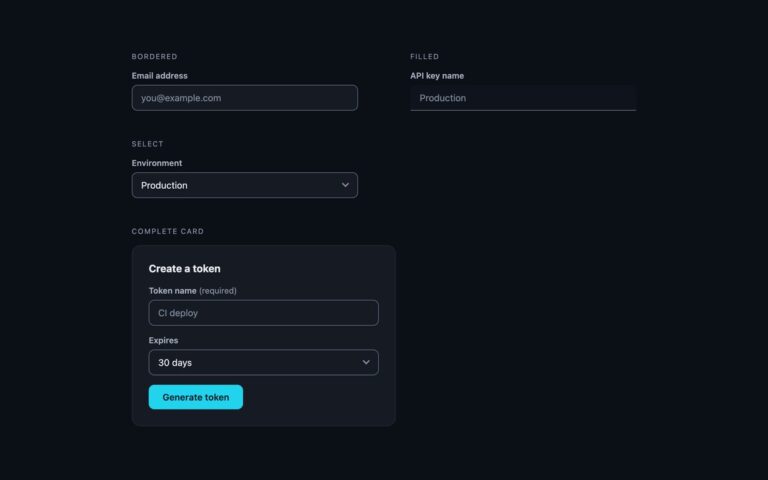
Styles for the two controls that look most out of place by default. Custom arrow keeps a native select element, so the option list, keyboard use and mobile pickers all stay the browser’s own, but removes the platform arrow with appearance: none and draws a chevron in its place from two borders of a rotated square. Multiple shows a four-row multi-select with rounded option rows and a hint that explains Ctrl and Command selection, linked with aria-describedby. Textarea is a resizable field with a 110px minimum height and relaxed line spacing for longer answers. With a counter adds a live character count under a 160-character bio: maxlength stops input at the limit, and a few lines of script keep the count in step as you type, with visually hidden text so it reads as characters rather than a fraction. Use the custom select wherever the default arrow clashes with the rest of the form. In Bootstrap the select is .form-select with its arrow swapped through –bs-form-select-bg-img; in Tailwind the chevron is drawn with after: utilities on a wrapper.

What’s included

  • Native select with a drawn chevron, no replacement widget
  • Multiple select with a hint for choosing several options
  • Vertically resizable textarea with a 110px minimum
  • Live character counter with maxlength
  • Bootstrap version uses .form-select and --bs-form-select-bg-img

Accessibility

Selects stay native, so arrow keys, type-ahead and screen reader announcements work as normal. Every control has a visible label; the multiple select's hint and the counter are referenced with aria-describedby, and the counter includes visually hidden text so it is read as a character count. Borders reach 3:1 and hint text 4.5:1. Focus adds a blue border and 3px ring, removed from the transition list under prefers-reduced-motion.

Customise it

In plain CSS change --f-border, --f-focus, --f-ring and --f-hint on .f; --f-hint also colours the chevron. In Bootstrap edit the stroke colour inside --bs-form-select-bg-img and the --bs-* variables on .fx; in Tailwind edit the border- colour classes, including after:border- on the select wrapper.