
Gradebook — Free Teacher Dashboard Template
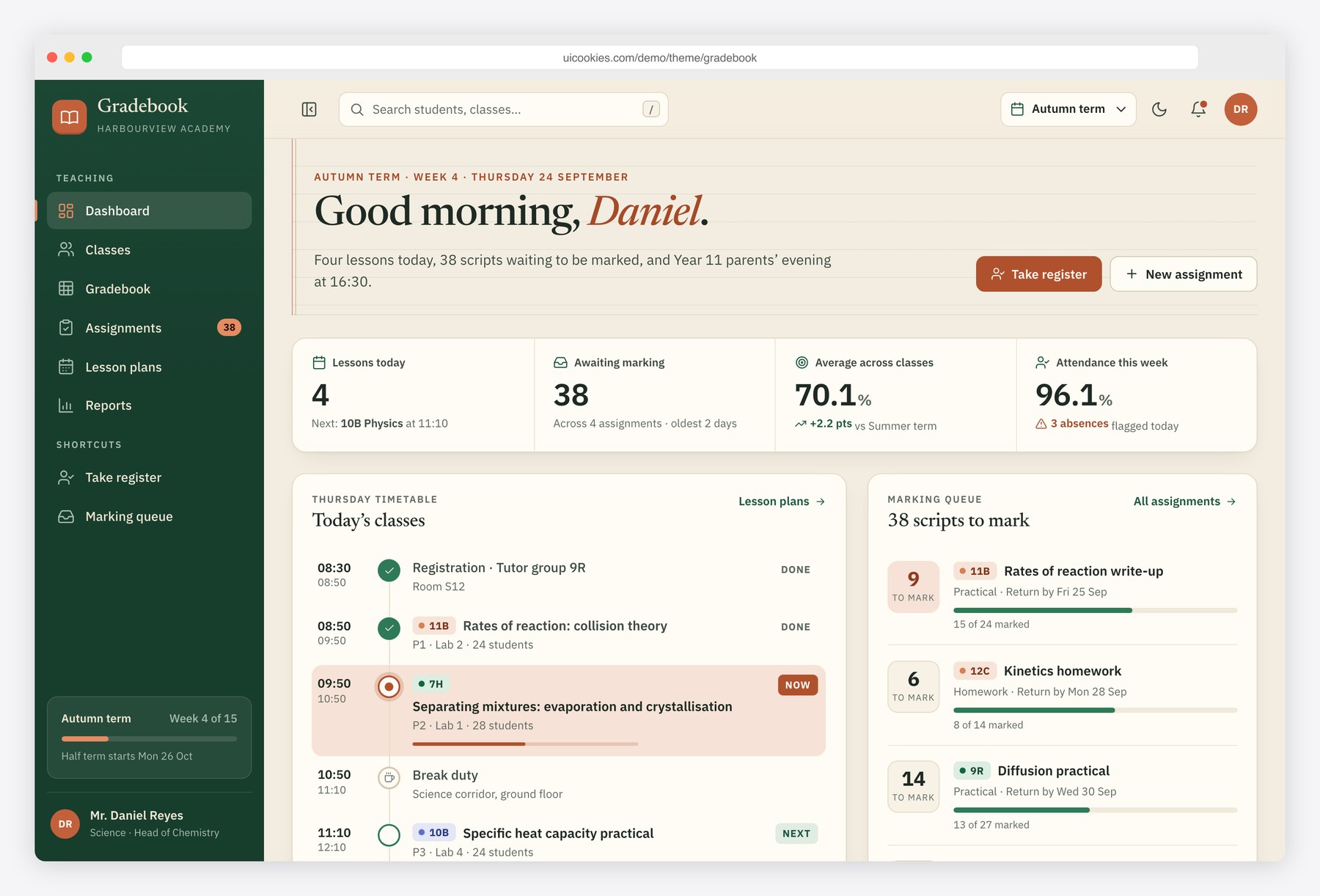
Gradebook is a teacher portal designed like a well-kept desk rather than another SaaS clone: forest green, warm cream and terracotta, with a Newsreader serif for headings and IBM Plex Sans with tabular figures for the numbers. The centrepiece is a markbook grid with a sticky header and name column, arrow, Enter and Tab navigation, a colour scale, undo and CSV export. Around it sit a dashboard, class cards, assignments with a rubric builder, a lesson plan board and a performance report, with every class, student and mark coming from one small data set in js/main.js.
Key features
- Spreadsheet-style gradebook: type marks straight into cells, move with the arrow keys, Enter and Tab, and undo with Ctrl+Z
- Per-student and per-assignment averages recalculate as you type, with a five-band colour scale that can be switched off
- Sticky header row, name column and average column, plus class switching, student search, sort and a marks or percent view
- Front-end CSV export of the current class, and edits kept in the browser with a reset option
- Dashboard with a today timeline, marking queue, SVG class averages chart and a tap-to-cycle attendance register
- Create-assignment form with validation and a rubric builder: add and remove criteria, live points total and weight bar
- Monday to Friday lesson plan board with a native dialog to add, edit and delete plans and a class filter
- Class report with a grade distribution histogram, top and at-risk students and a Summer to Autumn comparison chart
- Collapsible sidebar that becomes an offcanvas menu on mobile, a term selector, quick search and a light and dark theme
Best for
- School management systems and LMS products that need a teacher-facing front end
- Tutoring centres and academies tracking marks, homework and attendance
- Developers prototyping an education admin panel before wiring up an API
- Edtech teams who want an accessible, keyboard-friendly data grid to start from
At a glance
- Bootstrap 5.3.8 with vanilla JavaScript, no jQuery
- 6 pages: index.html, classes.html, gradebook.html, assignments.html, lesson-plans.html, reports.html
- Hand-built inline SVG charts, inline SVG icons and initials avatars, no chart or icon libraries
- Light and dark theme, collapsible sidebar with an offcanvas mobile menu
- Keyboard-accessible grid, skip link, landmarks, labelled fields and visible focus styles
- Free for personal and commercial use; attribution optional but welcome. Full terms: uicookies.com/license
How to use it
Unzip the folder and open index.html in a browser; there is no build step. Edit the page copy in the HTML files and the demo classes, students and marks at the top of js/main.js. Colours, fonts and spacing live as custom properties at the top of css/style.css, with a dark theme block beneath. Forms and the register only show a success state, so connect them to your backend or a form service. Upload the folder to any static host.
Frequently asked questions
Is the Gradebook template free for commercial projects?
Yes. You can use it for personal and commercial work, including client projects and products you sell access to. Attribution is optional but always welcome. The full terms are at uicookies.com/license.
What is it built with?
Bootstrap 5.3.8 for the grid and components, one css/style.css design layer and one js/main.js file in plain JavaScript. There is no jQuery and no chart library; the charts are inline SVG drawn from small data arrays.
Which pages are included?
Six: a teacher dashboard, a classes overview, the gradebook grid, assignments with a rubric builder, a weekly lesson plan board and a class performance report. They share the sidebar, topbar, term selector and theme toggle.
How does the gradebook grid work with the keyboard?
Arrow keys move between marks, typing a number or pressing Enter starts editing, Enter saves and moves down, Tab saves and moves right, and Escape cancels. Delete clears a mark, Home and End jump along the row, and Ctrl+Z undoes the last change.
Do the forms and marks save to a server?
No. Forms validate in the browser and show a success state, and gradebook edits are kept in the browser’s local storage so the demo feels real. Connect the forms and the grid to your own API or database to store data for real.