
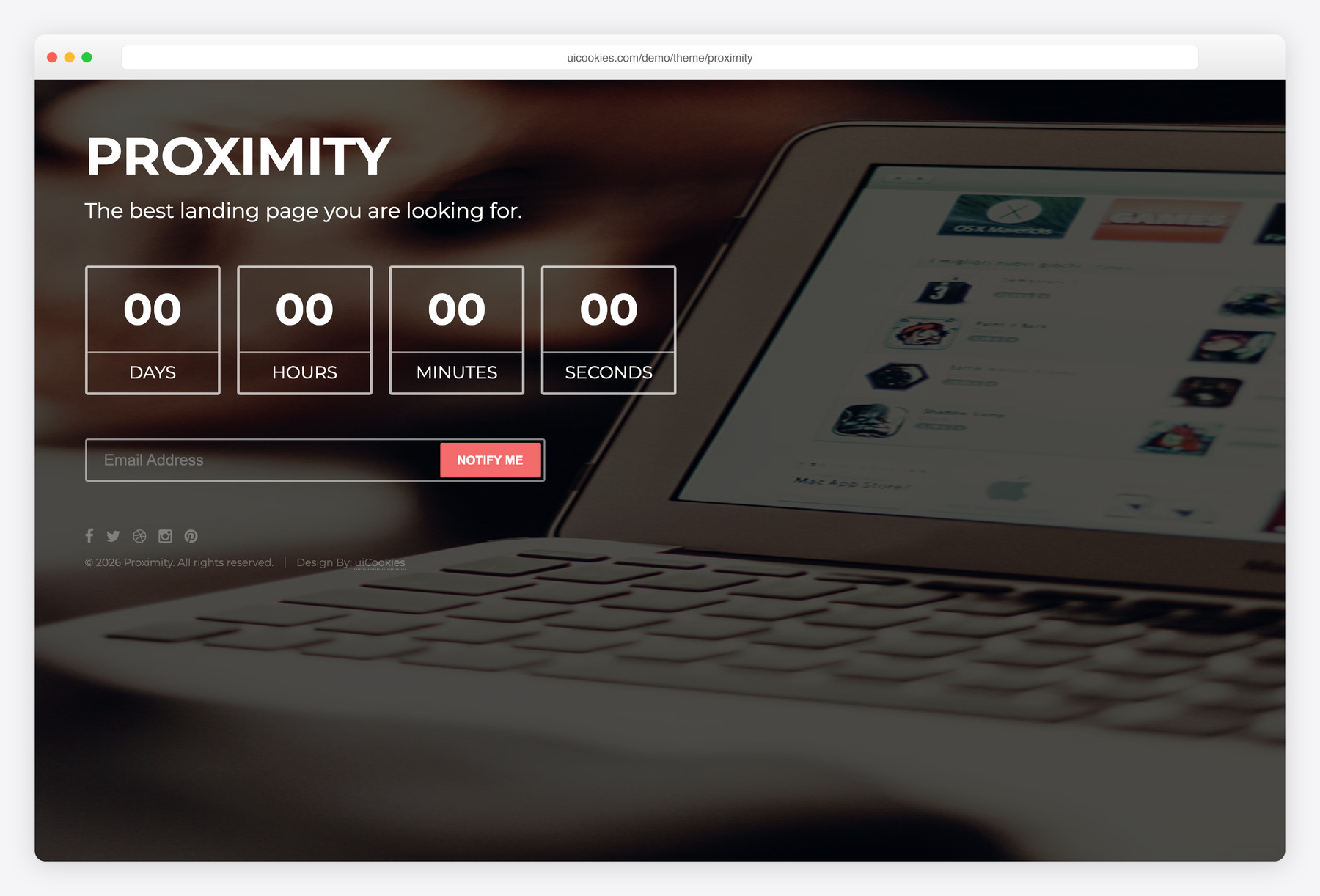

Proximity — Free Coming Soon Website Template
Proximity is a single-page coming-soon template: a holding page to put up while your real site is under construction. It shows a name heading, a short tagline, a countdown and an email field for visitors who want to hear about the launch. The countdown runs to a date 30 days ahead by default, or to your launch date if you set one with a data-date attribute on the countdown element. It suits product launches, new businesses and site rebuilds. There is no CSS framework: it uses its own stylesheet and vanilla JavaScript, no jQuery.
Key features
- Single holding page for a site that is under construction
- Countdown that runs to a date 30 days ahead by default
- Set your own launch date with a data-date attribute on the countdown element
- Email field for launch sign-ups (front-end only)
- Name heading and a short tagline you can rewrite
- Font Awesome icon font included
- No CSS framework: styles in style.css, behaviour in scripts.js, no jQuery
Best for
- Putting a holding page on a new domain before launch
- Product or business launches with a fixed date
- Covering a site while it is being rebuilt
- Collecting email addresses before launch, once the form is connected
At a glance
- Stack: no CSS framework; its own stylesheet (style.css) and vanilla JavaScript (scripts.js), no jQuery
- Pages: 1 (index.html)
- Form: one email field, front-end only; it sends nothing until you connect a mailing-list or form service
- Countdown: 30 days ahead by default, or the date in the countdown element’s data-date attribute
- Icons: Font Awesome
- Licence: free for personal and commercial use, including client work; attribution optional but always welcome; no paid tiers. Full terms: uicookies.com/license
How to use it
Download the zip, unzip it and open index.html in a browser. Replace the name and tagline in index.html, then add a data-date attribute with your launch date to the countdown element; without one, the timer counts down to a date 30 days ahead. Styles live in style.css and the page script in scripts.js. The email form sends nothing on its own, so connect it to a mailing-list or form service. Then upload the folder to any static host.
Frequently asked questions
Can I use Proximity for commercial or client projects?
Yes. Proximity is free for personal and commercial use, including client work, and there are no paid tiers. Attribution is optional but always welcome, so you can keep or remove the credit line. Full terms: uicookies.com/license
Does Proximity use Bootstrap or jQuery?
Neither. It has no CSS framework and no jQuery: the layout comes from its own style.css and the behaviour from one vanilla JavaScript file, scripts.js. Font Awesome is the only other stylesheet it loads.
Is Proximity a full website?
No. It is a single coming-soon or under-construction page with a name, a tagline, a countdown and an email field. Put it up while the real site is being built, then replace it at launch.
How do I set the launch date and collect emails?
Add a data-date attribute with your launch date to the countdown element; without it, the countdown runs to a date 30 days ahead. The email field is front-end only, so connect the form to a mailing-list or form service before you rely on it.

I loved the design, its really cool
Thanks a lot Adil for your valuable review. It really inspires us and fuels us to do more work for the community 🙂
Love the template. But ive noticed that the countdown doesnt work with Chrome. Is there a quick fix for this ? thanks