
Vesta — Free Fashion Store Website Template
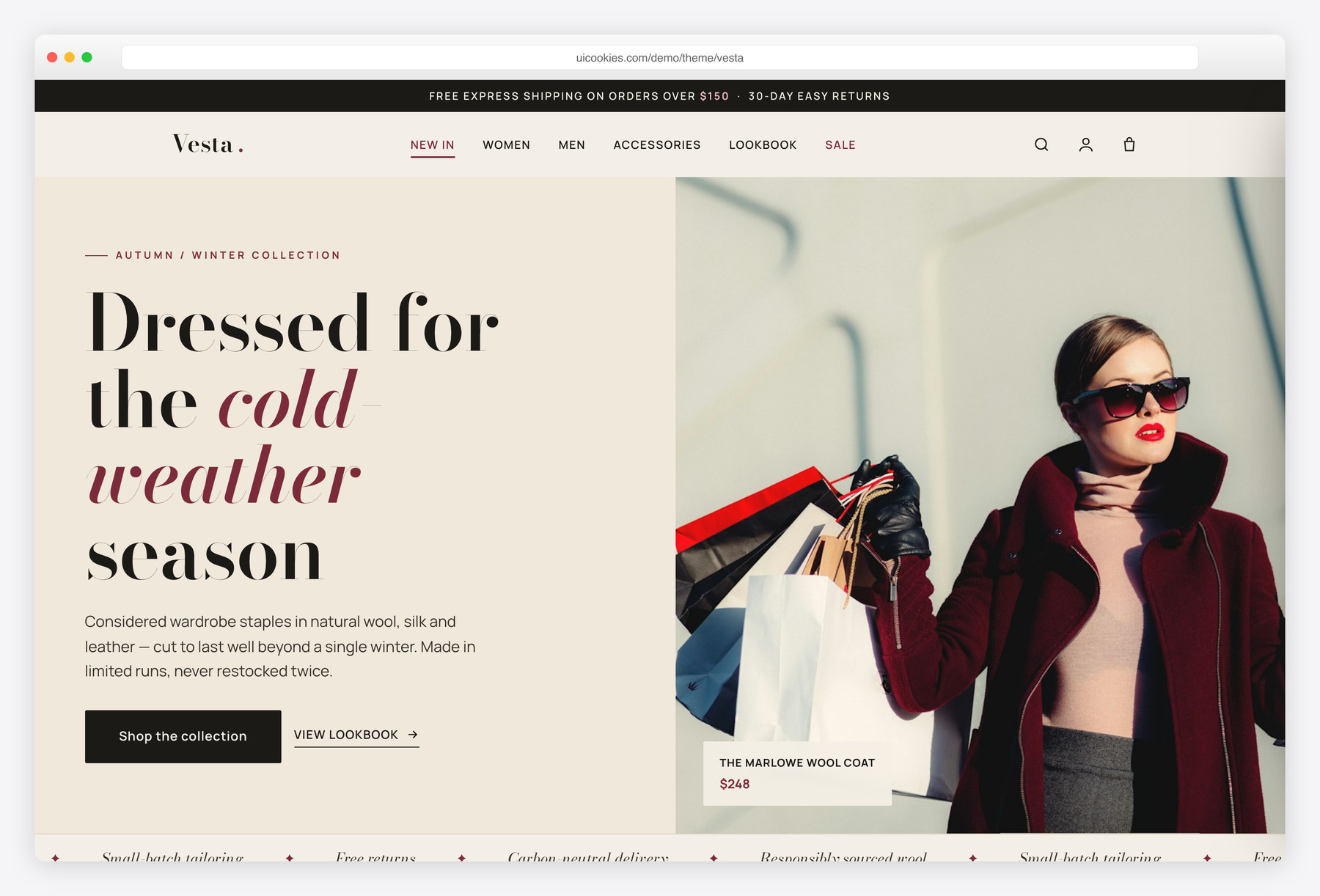
Vesta is a free, premium Bootstrap 5 fashion e-commerce template with a full storefront and a complete product detail page. Every shopping interaction — category filtering, a slide-in cart drawer, gallery swapping, colour and size pickers, and tabs — is built in vanilla JavaScript with no jQuery. Its editorial identity pairs a Bodoni display serif with a clean sans over a warm off-white and deep oxblood palette.
Key features
- Two pages: a full storefront (index.html) and a product detail page (product.html)
- Slide-in cart drawer with add, remove, quantity steppers, live subtotal and free-shipping progress
- Instant category filtering (Women / Men / Accessories / Shoes) with no page reload
- Product page with thumbnail gallery swap, colour swatches and a size picker with sold-out state
- Details / Size & Fit / Reviews tabs plus a keyboard-accessible image lightbox
- Scroll-snap new-arrivals carousel, countdown sale strip and animated count-up stats
- Sticky blur navbar, slide-down search and an off-canvas mobile menu
- Self-hosted Bootstrap 5, no CDN dependency and no jQuery
- Accessible: semantic landmarks, ARIA, visible focus and prefers-reduced-motion support
Best for
- Fashion and clothing online stores
- Boutique and apparel brands
- Accessories and footwear shops
- Small-batch or capsule collection launches
- Any modern e-commerce landing page
At a glance
- Pages:
index.html(storefront) +product.html(product detail) - Framework: Bootstrap 5, self-hosted (no CDN dependency)
- JavaScript: 100% vanilla — no jQuery, one function per feature
- Fonts: Bodoni Moda (display) + Manrope (UI/body) via Google Fonts
- Palette: warm ink near-black, deep oxblood accent, warm off-white (CSS custom properties)
- Responsive, mobile-first; images carry width/height + lazy-loading
- Free for personal and commercial use

How to use it
Download the ZIP, unzip it, and open index.html — no build step, nothing to install. Edit the text and images, point any forms at your backend or a form service, and deploy the folder to any static host. Colours and fonts live in css/style.css; the interactions are in js/main.js.
Frequently asked questions
Is the Vesta template really free to use?
Yes. Vesta is free for both personal and commercial projects. You can use it to build a real store, customise it for a client, or learn from the code. There is no attribution requirement baked into the template, though a mention is always appreciated.
Does Vesta use jQuery?
No. Every interaction is written in modern vanilla JavaScript, organised as one function per feature with guard clauses. That includes the cart drawer, category filter, product gallery, tabs, lightbox, countdown and testimonial slider. The only bundled library is Bootstrap's own JavaScript bundle, which is self-hosted.
Which Bootstrap version is it built on?
Vesta is built on Bootstrap 5, self-hosted from the css/vendor and js/vendor folders so there is no CDN dependency. It uses Bootstrap's grid and utility classes as a foundation, then layers a heavily customised design system on top through css/style.css so it does not look like a stock Bootstrap starter.
Is the shopping cart functional?
The cart is a fully interactive front-end demo. You can add products from any quick-add or the product page, change quantities, remove lines, and watch the subtotal and free-shipping progress bar update live. It is client-side only and does not process real payments — connect it to your own backend, Shopify, Snipcart or similar to take live orders.
How do I add or edit products?
Products are plain HTML cards in index.html. Each card carries data attributes (data-id, data-name, data-price, data-img and an optional data-variant) that feed the cart, so you edit the copy and swap those values to change a product. Duplicate a card to add another, and drop your image into the img folder using the referenced filename.
Is Vesta responsive and accessible?
Yes on both counts. The layout is mobile-first and reflows cleanly from a four-column grid down to a single column, with the navbar collapsing into an off-canvas menu. Accessibility is built in with semantic landmarks, alt text on every image, ARIA roles on custom widgets, visible focus styles, keyboard support for the cart, tabs and lightbox, and full prefers-reduced-motion handling.
What's included in the download?
You get two ready-to-use HTML pages (index.html and product.html), a single custom stylesheet (css/style.css), one vanilla JavaScript file (js/main.js), and self-hosted copies of Bootstrap's CSS and JS bundle. Images are referenced by local path in the img folder so you can drop in your own photography.
Can I change the colours and fonts?
Easily. The entire palette is defined as CSS custom properties in the :root block at the top of css/style.css, so you can re-theme the whole template by editing a handful of variables. Fonts are loaded from Google Fonts in the page head — swap the link and the two font-family variables to change the typography.