
Pearl — Free Dental Clinic Website Template
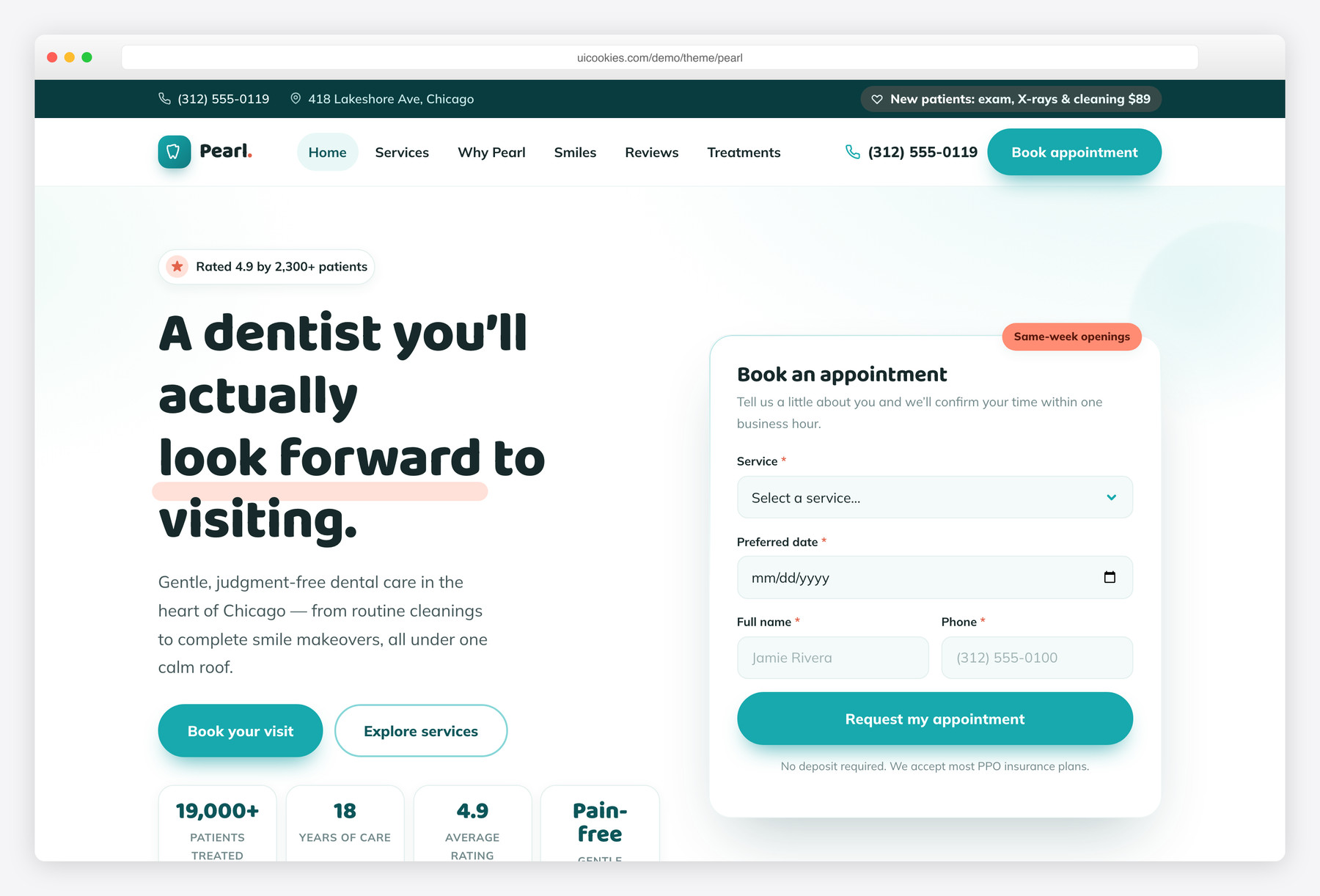
Pearl is a free Bootstrap 5 website template for dental clinics and cosmetic dentists, with a calm teal-and-coral design, softly rounded cards, and generous whitespace. It includes a conversion-focused homepage and a detailed treatments-and-booking page, both built with vanilla JavaScript and no jQuery. Interactive pieces — an appointment form, a before/after smile slider, count-up trust badges, a testimonials slider, and a native FAQ accordion — all work while keeping content fully visible with JavaScript off.
Key features
- Homepage plus a detailed treatments and booking page
- Sticky navbar with a working mobile menu and Book appointment CTA
- Inline hero appointment mini-form and a full booking form with validation
- Working before/after smile slider with selectable cases
- Animated count-up trust badges and a testimonials slider
- Native details/summary FAQ accordion and first-visit timeline
- Transparent pricing table, financing note, and insurance chip strip
- Self-hosted Bootstrap 5, Baloo 2 + Mulish fonts, no jQuery
- Accessible and progressively enhanced — content works with JS off
Best for
- Dental clinics and family dentists
- Cosmetic dentists and smile studios
- Orthodontic and Invisalign practices
- Dental implant centers
- Any local healthcare practice taking online bookings
At a glance
- Category: Medical / Dental
- Pages: index.html, services.html
- Framework: Bootstrap 5 (self-hosted)
- JavaScript: Vanilla only — no jQuery
- Fonts: Baloo 2 (display) + Mulish (body)
- License: Free for personal and commercial use

How to use it
Download the ZIP, unzip it, and open index.html — no build step, nothing to install. Edit the text and images, point any forms at your backend or a form service, and deploy the folder to any static host. Colours and fonts live in css/style.css; the interactions are in js/main.js.
Frequently asked questions
Is Pearl really free to use?
Yes. Pearl is free for both personal and commercial projects, so you can use it for a real dental practice website at no cost. There's no attribution requirement baked into the layout, though a link back is always appreciated. You're free to customize the colors, copy, and images to match your own clinic.
Does Pearl use jQuery?
No. Every interaction — the mobile menu, appointment forms, before/after slider, count-up badges, testimonials slider, and FAQ — is written in plain vanilla JavaScript. This keeps the template lightweight and easy to maintain, with no legacy dependencies. Bootstrap 5's own bundle is the only third-party script, and it's self-hosted.
Which pages are included?
Pearl ships with two pages. The homepage (index.html) covers the hero with an inline appointment form, services, why-choose-us, the dentist team, a before/after gallery, a first-visit timeline, pricing, testimonials, insurance partners, an FAQ, and a booking CTA. The services page (services.html) goes deeper into each treatment with prices and times, a full pricing table, and a complete booking form.
Will the content still show if JavaScript is disabled?
Yes — Pearl is built with progressive enhancement. All text, images, and sections render fully with JavaScript turned off; scripts only add motion and interactivity on top. The reveal animations start from a hidden state only when a .js class is present, so search engines and users without JavaScript always see complete content.
How do the appointment and booking forms work?
Both forms validate required fields in the browser with vanilla JavaScript — checking for a chosen service, a valid date, name, phone, and email — then show a friendly confirmation message. Because Pearl is a static template, the forms don't send data anywhere by default. To make them live, connect the form to your booking system, a form service like Formspree, or your own backend endpoint.
Can I change the teal and coral color scheme?
Easily. The entire palette is defined as CSS custom properties at the top of css/style.css — teal shades, the warm coral accent, mint support, and neutrals. Change a handful of variables and the whole site updates consistently: buttons, icons, cards, and section tints all reference those tokens. You can commit to sky-blue, a deeper teal, or a different warm accent in minutes.
Is the before/after smile slider customizable?
Yes. The slider reads image paths from data attributes on each case button, so you swap in your own before/after photos by editing those paths and labels in the HTML — no JavaScript changes needed. It supports a draggable handle, a keyboard-accessible range input, and multiple selectable cases. Add or remove case buttons to match how many transformations you want to show.
Is Pearl accessible and mobile-friendly?
It's designed to be both. The markup uses semantic landmarks, every image has descriptive alt text, custom widgets carry ARIA attributes, and there are visible focus styles plus keyboard support for the menu, slider, FAQ, and forms. The layout is mobile-first and fully responsive, with the navbar collapsing into a working slide-in mobile menu on smaller screens.