
Roster — Free Job Board Website Template
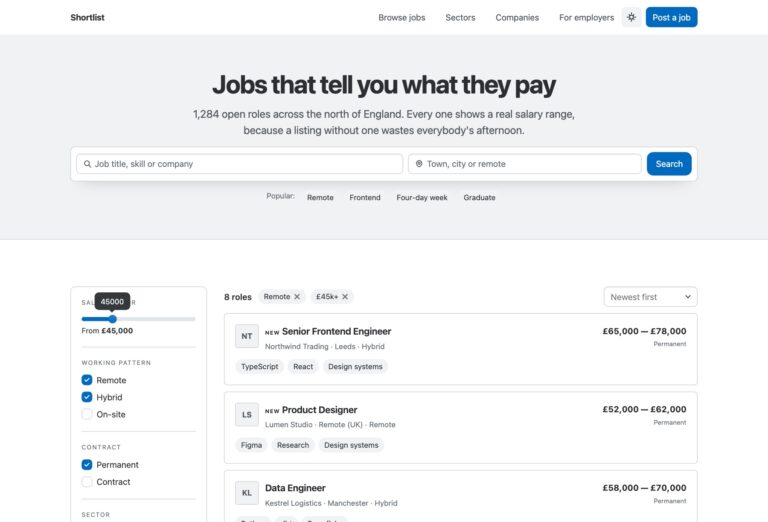
Roster is a free, two-page job board and careers website template built on Bootstrap 5 and maintained in-house by uiCookies. It combines a conversion-focused landing page — hero job search, category grid, featured listings, a tabbed how-it-works widget, employer CTA and job alerts — with a full job-board page driven by a left sidebar of filters. All filtering is plain vanilla JavaScript: keyword, category, job type, salary range and remote-only controls update the listings instantly with no page reload and no jQuery.
Key features
- Two pages: a landing page plus a full sidebar-filtered job board
- Instant vanilla-JS filtering by keyword, category, job type, salary and remote-only
- Hero search bar with keyword, location and category, plus popular-search chips
- Job cards with coloured logo-initial chips, type badges and tabular salary ranges
- Browse-by-category grid with live job counts and URL-param handoff to the board
- Animated count-up stats via IntersectionObserver
- Tabbed how-it-works widget with candidate and employer flows
- Employer CTA band, job-alerts signup and a native-details FAQ accordion
- 100% Bootstrap 5, no jQuery, no plugins; progressive enhancement and reduced-motion support
Best for
- Job boards and niche career sites
- Recruitment and staffing agencies
- Company careers and 'we're hiring' pages
- Marketplaces matching candidates with employers
- Developers wanting a jQuery-free Bootstrap 5 board to extend
At a glance
- Two pages: landing (index.html) + full job board (jobs.html)
- Bootstrap 5 with no jQuery and no plugin dependencies
- Instant vanilla-JS filtering shared across both pages, with URL-param handoff from category cards
- Progressive enhancement: all content is visible with JavaScript disabled
- Accessible: semantic landmarks, ARIA tabs/switch, visible focus, keyboard support, reduced-motion aware
- Self-hosted Bootstrap 5, Google Fonts (Plus Jakarta Sans + Figtree), inline SVG icons

How to use it
Download the ZIP, unzip it, and open index.html — no build step, nothing to install. Edit the text and images, point any forms at your backend or a form service, and deploy the folder to any static host. Colours and fonts live in css/style.css; the interactions are in js/main.js.
Frequently asked questions
Is Roster free to use, including for commercial projects?
Yes. Roster is free under the standard uiCookies license, which covers both personal and commercial projects. Attribution is appreciated and the exact terms are on the uiCookies license page. There is no paid tier or locked version — the download is the complete template.
How does the job filtering work?
All filtering is plain vanilla JavaScript with no page reloads. On the landing page a toolbar filters listings by keyword, category and job type. On the full job board (jobs.html) a left sidebar adds category checkboxes, job-type checkboxes, a minimum-salary slider and a remote-only toggle, plus sorting by most recent or highest salary. Category cards on the landing page even pass your choice to the board through a URL parameter.
Does Roster require jQuery or any plugins?
No. Every behaviour — the mobile menu, sticky navbar, live filtering, count-up stats, tabbed how-it-works widget and form validation — is written in vanilla JavaScript. The only bundled library is Bootstrap 5's own JavaScript bundle. That keeps the template light and removes plugin dependencies you would otherwise have to maintain.
Is the template responsive and mobile-friendly?
Yes. Roster is mobile-first and built on the Bootstrap 5 grid, so it adapts from large desktops down to phones. The navbar collapses into a working mobile menu, the hero search stacks vertically, and on the job board the sidebar filters collapse behind a Filters button that toggles them open.
Will the content still show if JavaScript is disabled?
Yes. Roster is built with progressive enhancement, so all content is fully visible with JavaScript off. The scroll-in animations only add their hidden start state when a 'js' class is present, and the tab panels and job listings render at full opacity by default. JavaScript enhances the experience — it is never required to read the page.
How do I add or edit job listings?
Each job is a self-contained HTML card with data attributes for its category, job type, salary and searchable keywords. Duplicate a card, change the title, company, logo-initial chip, location, salary range and skill tags, and set the data attributes to match — the filtering picks it up automatically. There is no build step or database required to launch.
Is Roster accessible?
Accessibility is built in. The template uses semantic landmarks, alt text on every image, visible focus styles, and ARIA on the custom widgets — the how-it-works tabs support arrow-key navigation and the remote-only control is a real checkbox switch. Animations respect the prefers-reduced-motion setting, and the forms are labelled and keyboard-operable.
Do the search, apply and alert forms actually work?
Roster is a static front-end template, so the forms are fully marked up and validated but have no backend attached. The hero search and filters run entirely in the browser against the sample listings, and the job-alerts form validates the email and shows a confirmation. To make submissions live, connect the forms to a form-handling service or your own server-side script and wire the listings to your data source.