
Cardfile — Free vCard Resume Website Template
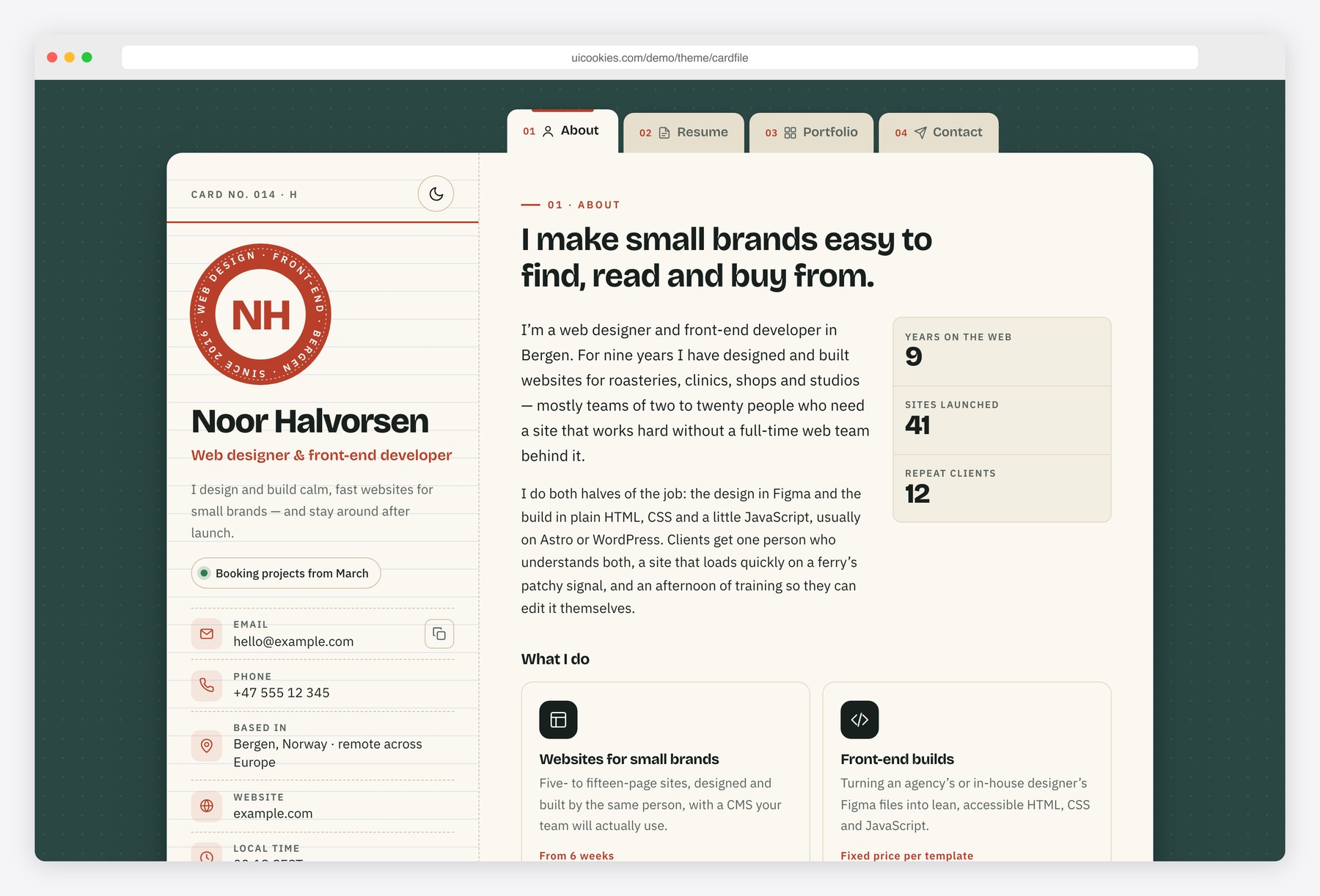
Cardfile is a personal resume site in the classic vCard layout: everything lives on one centred card, styled like a filed index card with ruled lines, a red header rule and divider tabs. The tabs switch sections without a page load, work with the arrow keys and update the address bar, so every section can be shared as its own link. Visitors can save the contact as a .vcf file, switch between light and dark themes, and print the whole card as a one-page CV.
Key features
- Single centred card with a sticky profile column: initials portrait stamp, role, availability, contact list and social links
- About, Resume, Portfolio and Contact as ARIA tabs with arrow, Home and End key support and deep links such as #resume
- All four sections stack and stay readable when JavaScript is off; the tabs then work as jump links
- Download vCard button that builds a .vcf contact file in the browser from the profile details in the HTML
- Experience and education timelines, plus skill bars that also state each level in words
- Portfolio grid with category filter, live result count and a <dialog> lightbox with previous and next controls
- Four service cards, a client testimonial and a client list set as text wordmarks
- Light and dark themes that follow the system setting, with a toggle remembered per browser
- Contact form with browser validation and a success state, plus copy-to-clipboard email and a live local clock
- Print stylesheet that turns the card into a one-page CV with the tabs, form and buttons removed
Best for
- Freelance web designers and developers who want a compact personal site
- Job seekers who need an online resume and a printable CV from the same page
- Photographers and designers showing a small, filterable portfolio
- Anyone who wants a contact card visitors can save straight to their phone
At a glance
- Bootstrap 5.3.8 with vanilla JavaScript, no jQuery
- 1 page: index.html, with four tabbed sections (About, Resume, Portfolio, Contact)
- Bricolage Grotesque and IBM Plex Sans from Google Fonts; palette and type as CSS custom properties
- Light and dark themes, both driven by the same custom properties
- Print stylesheet: the whole card prints as a one-page CV
- All content visible without JavaScript; tabs, filter, lightbox and vCard download are progressive enhancements
- Free for personal and commercial use; attribution optional but welcome. Full terms: uicookies.com/license
How to use it
Unzip the folder and open index.html in a browser; there is no build step. Replace the name, contact details, experience and projects in the HTML; the vCard download reads the profile details from the same markup, so it updates with them. Colours and fonts live as custom properties at the top of css/style.css, with a dark set below them. The contact form validates in the browser only, so connect it to a form service, then upload the folder to any static host.
Frequently asked questions
Is Cardfile free for commercial use?
Yes. Cardfile is free for personal and commercial projects, including client work. Attribution is optional but always welcome; the full terms are at uicookies.com/license.
What is Cardfile built with?
Bootstrap 5.3.8 for the grid and base styles, one stylesheet for the design layer and one vanilla JavaScript file. There is no jQuery or other JavaScript library, and every icon is inline SVG.
Which sections are included?
One page with four tabs. About has a biography, service cards, a testimonial and a client list; Resume has experience and education timelines, skill bars, tools and languages; Portfolio has a filterable grid with a lightbox; Contact has a validated form and contact details.
How does the Download vCard button work?
It reads the name, role, email, phone, website and city from the profile column and builds a standard .vcf file in the browser. Edit those details in index.html and the downloaded card changes with them; nothing is sent to a server.
Can I print the resume or save it as a PDF?
Yes. Use the Print CV button or the browser’s print command. The print stylesheet removes the tabs, form and buttons and lays out all four sections on one page, which you can save as a PDF from the print dialog.