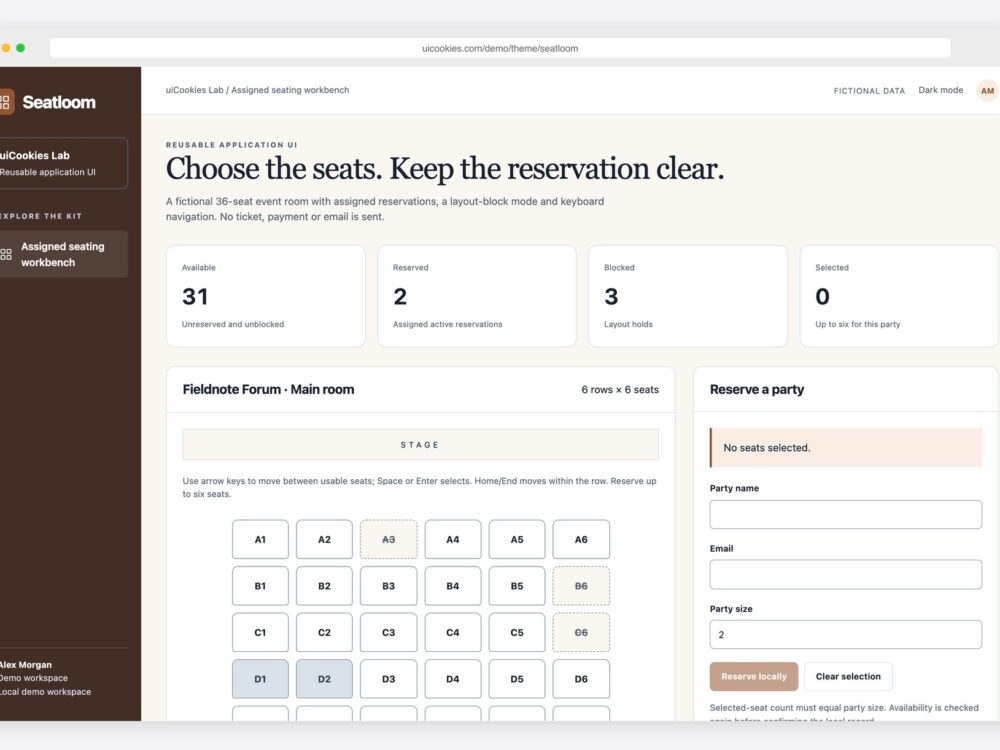
A keyboard accessible seat picker needs a clear way to enter the seat map, move between available choices, select seats and leave the map. Seatloom is a free event seating interface with a six-by-six seat map, booking history and browser-local availability checks.
Open the Seatloom demo and try the flow without a mouse. This is a frontend prototype: its reservations are fictional browser records, not real tickets, inventory holds or payments.
Use buttons with names that describe the seat
The map uses native buttons for seat choices. A seat needs an accessible name that identifies its position and state. Keep selection, reservation and blocked states distinct in the text or accessible name, rather than relying on a color legend alone. Seatloom updates the selected state while keeping the map available for review.
Inspect the button names in your browser’s accessibility tree when adapting the design. Row labels and a visual aisle help sighted visitors, but they do not replace an individual seat’s name.
Give the map one entry point
Seatloom uses roving tabindex: one navigable seat is in the page’s Tab sequence, while the other seat buttons have tabindex -1. Arrow navigation moves that entry point and focus together. The page’s other controls still use their normal Tab order. This avoids forcing someone to Tab through every seat before reaching the booking form.
Read MDN’s keyboard widget guidance for the focus-management pattern. Keep the focus indicator visible when changing the map’s colors.
| Key | Seatloom behavior to check |
|---|---|
| Tab | Enter the map at its current roving entry point; continue to the next page control. |
| Arrow keys | Move focus through the map, skipping reserved or blocked choices. |
| Home / End | Move to an available seat at the beginning or end of the current row. |
| Enter / Space | Use the native button action to select or deselect an available seat. |
Separate focused, selected and unavailable
Focus is where the next keyboard action will land. Selection is the set of seats the visitor intends to book. A reserved or blocked seat cannot be selected. Check these states independently: move focus away from a selected seat and confirm that its selection remains apparent.
The demo allows up to six selected seats and checks the selection against party size before confirming. Try selecting too few seats, changing party size after selecting, and deselecting a seat. The summary should explain what remains to be done without erasing the visitor’s choices unnecessarily.
Recheck availability at the confirmation boundary
Seatloom rereads local state before confirming a reservation, which helps demonstrate a conflict response when availability changes. To exercise it, open two tabs in the same browser, select the same available seat in both, confirm one, then attempt to confirm the other.
The second tab should respond to the changed local availability. This browser check demonstrates the UI state; it does not provide server-side concurrency control. Real booking needs an authoritative inventory service that reserves seats atomically, expires holds and prevents two buyers from owning the same seat.
Make cancellation part of the example
Confirm a local booking, find it in history and cancel it. The related seats become available again while the history retains the cancelled outcome. Check the availability summary and map after cancellation, then try a new booking.
Before shipping a real booking flow, test with keyboard users and screen readers, and connect names, payment status and inventory changes through your backend. Include error recovery when a hold expires or a reservation request fails. A working keyboard pattern is one part of that complete experience.
For the surrounding event experience, browse event website templates and Gatehouse attendee check-in. Seatloom supplies the seat-selection workflow between discovery and attendance.