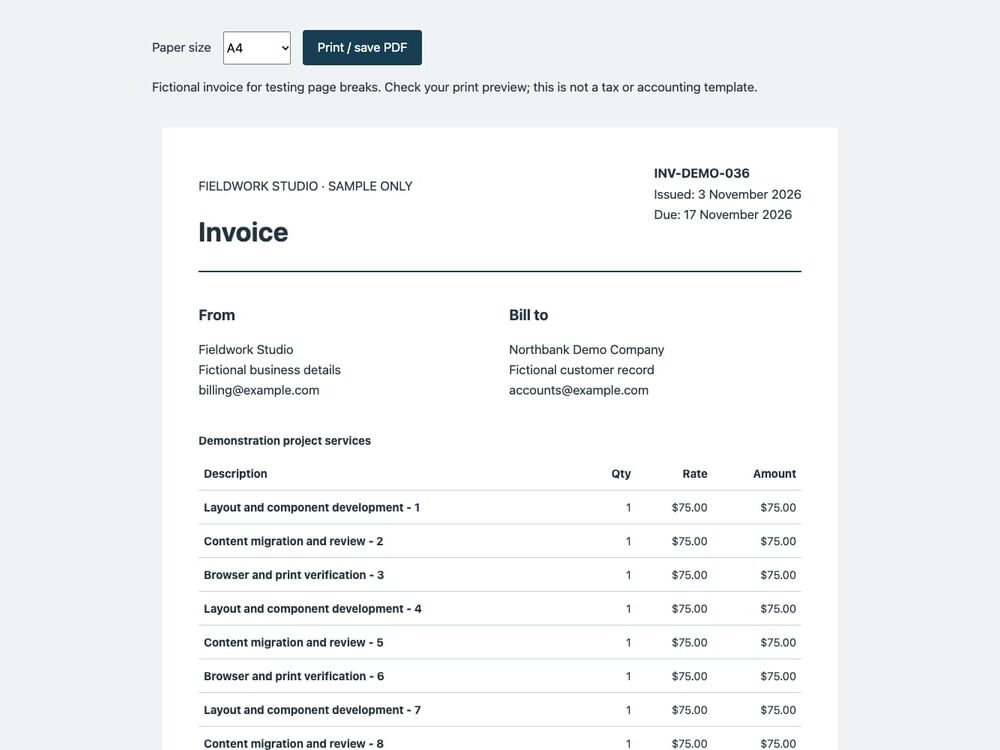
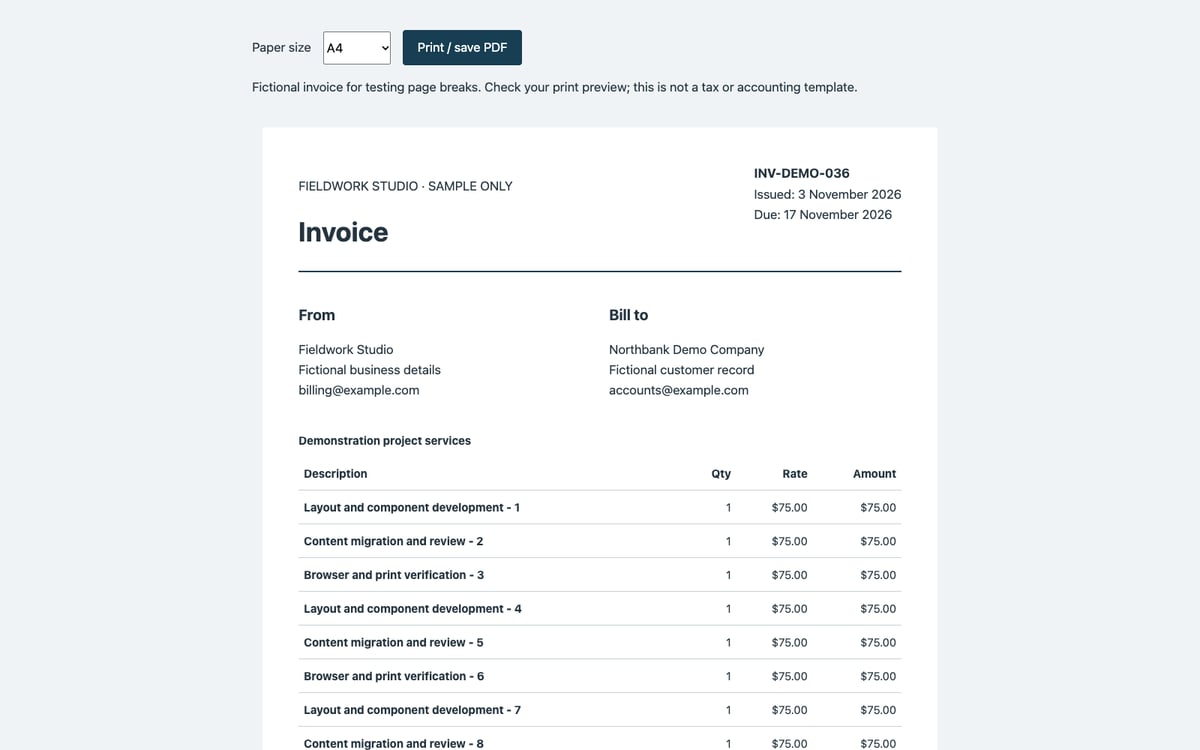
A printable HTML invoice needs more than a print button. This example keeps the invoice in normal HTML, requests A4 or US Letter through @page, repeats table headings and avoids splitting individual line items. The sample has 36 rows so page breaks are visible rather than theoretical.
Open the working preview · Compare the related templates and components
Build the example
- Save index.html and open it in a browser. Choose A4 or US Letter, then use Print / save PDF. The browser’s print dialog can override CSS paper settings, so check both controls agree.
- Keep the document readable on screen. A keyboard-focusable region contains the wide line-item table on a phone; the print stylesheet removes that scrolling container for paper.
- Use a real table with a caption and column headers. The print stylesheet keeps thead as a table-header group and applies break-inside: avoid to rows.
- Place the totals after the table and keep the group together. Hiding screen-only controls in print prevents buttons and explanations from entering the invoice.
- Adjust real company, payment and tax fields for the business issuing the document. The included names, dates, amounts and zero-tax assumption are fictional examples.
Behavior and limits
- Both print formats were rendered in Chromium and visually inspected. Browser and physical-printer settings can change scaling, margins and pagination.
- The example tests document layout, not invoicing law, tax rules or payment collection. It does not create invoice numbers or send invoices.
- Without JavaScript the invoice remains readable; choose the paper size in the browser’s own print dialog.
Complete source files
Save the complete HTML file below. Its styles and behavior are included; the offcanvas example additionally loads its pinned Bootstrap files. Copy only the relevant elements, styles and script when integrating with a larger template.
Complete index.html
<!doctype html>
<html lang="en">
<head>
<meta charset="utf-8" />
<meta name="viewport" content="width=device-width,initial-scale=1" />
<title>Print an HTML invoice on A4 or Letter — uiCookies example</title>
<style>
* {
box-sizing: border-box;
}
body {
margin: 0;
font:
17px/1.6 system-ui,
sans-serif;
color: #24343f;
background: #eff3f5;
}
a {
color: #175474;
text-underline-offset: 3px;
}
button,
input,
select {
font: inherit;
}
button,
select {
min-height: 44px;
}
button {
cursor: pointer;
}
button:focus-visible,
a:focus-visible,
input:focus-visible,
select:focus-visible,
[tabindex]:focus-visible {
outline: 3px solid #b54c12;
outline-offset: 3px;
}
.toolbar {
max-width: 960px;
margin: 24px auto;
padding: 16px;
display: flex;
align-items: center;
gap: 16px;
flex-wrap: wrap;
}
.toolbar p {
flex-basis: 100%;
margin: 0;
}
.toolbar button {
background: #173e52;
color: #fff;
border: 0;
padding: 10px 20px;
border-radius: 4px;
}
.sheet {
max-width: 900px;
margin: 0 auto 40px;
background: #fff;
padding: 48px;
}
.invoice-head {
display: flex;
justify-content: space-between;
gap: 24px;
flex-wrap: wrap;
border-bottom: 2px solid #173e52;
padding-bottom: 24px;
}
h1 {
margin: 0;
font-size: 36px;
}
h2 {
font-size: 20px;
}
.meta {
display: grid;
grid-template-columns: 1fr 1fr;
gap: 24px;
margin: 24px 0;
}
.table-wrap {
overflow: auto;
}
table {
width: 100%;
min-width: 500px;
border-collapse: collapse;
font-size: 15px;
}
caption {
text-align: left;
font-weight: 700;
margin-bottom: 10px;
}
th,
td {
text-align: left;
padding: 10px 7px;
border-bottom: 1px solid #c8d1d6;
}
td {
text-align: right;
white-space: nowrap;
}
thead th:not(:first-child) {
text-align: right;
}
.totals {
margin: 24px 0 24px auto;
max-width: 310px;
display: grid;
grid-template-columns: 1fr auto;
gap: 8px 20px;
}
.totals dt,
.totals dd {
margin: 0;
}
.totals dd {
text-align: right;
}
.total {
font-size: 21px;
font-weight: 700;
}
.footnote {
font-size: 14px;
color: #475966;
}
.noscript {
padding: 16px;
background: #fff1d8;
}
@media (max-width: 600px) {
.sheet {
margin: 16px;
padding: 24px;
}
.meta {
grid-template-columns: 1fr;
}
}
@media print {
body {
background: #fff;
font-size: 10pt;
line-height: 1.4;
}
.toolbar,
.noscript {
display: none;
}
.sheet {
max-width: none;
margin: 0;
padding: 0;
}
.invoice-head {
padding-bottom: 12px;
}
h1 {
font-size: 24pt;
}
.meta {
margin: 14px 0;
grid-template-columns: 1fr 1fr;
}
.table-wrap {
overflow: visible;
}
table {
min-width: 0;
font-size: 9pt;
}
thead {
display: table-header-group;
}
tr {
break-inside: avoid;
}
th,
td {
padding: 7px 5px;
}
.totals,
.footnote {
break-inside: avoid;
}
.footnote {
font-size: 9pt;
}
}
</style>
</head>
<body>
<div class="toolbar">
<label for="paper">Paper size</label
><select id="paper">
<option value="A4">A4</option>
<option value="Letter">US Letter</option></select
><button id="print" type="button">Print / save PDF</button>
<p>
Fictional invoice for testing page breaks. Check your print preview;
this is not a tax or accounting template.
</p>
</div>
<noscript
><p class="noscript">
The invoice is readable without JavaScript. Use your browser’s print
command and choose A4 or Letter in its print settings.
</p></noscript
>
<main class="sheet">
<header class="invoice-head">
<div>
<p>FIELDWORK STUDIO · SAMPLE ONLY</p>
<h1>Invoice</h1>
</div>
<div>
<strong>INV-DEMO-036</strong><br />Issued: 3 November 2026<br />Due:
17 November 2026
</div>
</header>
<div class="meta">
<section>
<h2>From</h2>
<p>
Fieldwork Studio<br />Fictional business details<br />[email protected]
</p>
</section>
<section>
<h2>Bill to</h2>
<p>
Northbank Demo Company<br />Fictional customer record<br />[email protected]
</p>
</section>
</div>
<div
class="table-wrap"
role="region"
aria-label="Invoice line items"
tabindex="0"
>
<table>
<caption>
Demonstration project services
</caption>
<thead>
<tr>
<th scope="col">Description</th>
<th scope="col">Qty</th>
<th scope="col">Rate</th>
<th scope="col">Amount</th>
</tr>
</thead>
<tbody>
<tr>
<th scope="row">Layout and component development - 1</th>
<td>1</td>
<td>$75.00</td>
<td>$75.00</td>
</tr>
<tr>
<th scope="row">Content migration and review - 2</th>
<td>1</td>
<td>$75.00</td>
<td>$75.00</td>
</tr>
<tr>
<th scope="row">Browser and print verification - 3</th>
<td>1</td>
<td>$75.00</td>
<td>$75.00</td>
</tr>
<tr>
<th scope="row">Layout and component development - 4</th>
<td>1</td>
<td>$75.00</td>
<td>$75.00</td>
</tr>
<tr>
<th scope="row">Content migration and review - 5</th>
<td>1</td>
<td>$75.00</td>
<td>$75.00</td>
</tr>
<tr>
<th scope="row">Browser and print verification - 6</th>
<td>1</td>
<td>$75.00</td>
<td>$75.00</td>
</tr>
<tr>
<th scope="row">Layout and component development - 7</th>
<td>1</td>
<td>$75.00</td>
<td>$75.00</td>
</tr>
<tr>
<th scope="row">Content migration and review - 8</th>
<td>1</td>
<td>$75.00</td>
<td>$75.00</td>
</tr>
<tr>
<th scope="row">Browser and print verification - 9</th>
<td>1</td>
<td>$75.00</td>
<td>$75.00</td>
</tr>
<tr>
<th scope="row">Layout and component development - 10</th>
<td>1</td>
<td>$75.00</td>
<td>$75.00</td>
</tr>
<tr>
<th scope="row">Content migration and review - 11</th>
<td>1</td>
<td>$75.00</td>
<td>$75.00</td>
</tr>
<tr>
<th scope="row">Browser and print verification - 12</th>
<td>1</td>
<td>$75.00</td>
<td>$75.00</td>
</tr>
<tr>
<th scope="row">Layout and component development - 13</th>
<td>1</td>
<td>$75.00</td>
<td>$75.00</td>
</tr>
<tr>
<th scope="row">Content migration and review - 14</th>
<td>1</td>
<td>$75.00</td>
<td>$75.00</td>
</tr>
<tr>
<th scope="row">Browser and print verification - 15</th>
<td>1</td>
<td>$75.00</td>
<td>$75.00</td>
</tr>
<tr>
<th scope="row">Layout and component development - 16</th>
<td>1</td>
<td>$75.00</td>
<td>$75.00</td>
</tr>
<tr>
<th scope="row">Content migration and review - 17</th>
<td>1</td>
<td>$75.00</td>
<td>$75.00</td>
</tr>
<tr>
<th scope="row">Browser and print verification - 18</th>
<td>1</td>
<td>$75.00</td>
<td>$75.00</td>
</tr>
<tr>
<th scope="row">Layout and component development - 19</th>
<td>1</td>
<td>$75.00</td>
<td>$75.00</td>
</tr>
<tr>
<th scope="row">Content migration and review - 20</th>
<td>1</td>
<td>$75.00</td>
<td>$75.00</td>
</tr>
<tr>
<th scope="row">Browser and print verification - 21</th>
<td>1</td>
<td>$75.00</td>
<td>$75.00</td>
</tr>
<tr>
<th scope="row">Layout and component development - 22</th>
<td>1</td>
<td>$75.00</td>
<td>$75.00</td>
</tr>
<tr>
<th scope="row">Content migration and review - 23</th>
<td>1</td>
<td>$75.00</td>
<td>$75.00</td>
</tr>
<tr>
<th scope="row">Browser and print verification - 24</th>
<td>1</td>
<td>$75.00</td>
<td>$75.00</td>
</tr>
<tr>
<th scope="row">Layout and component development - 25</th>
<td>1</td>
<td>$75.00</td>
<td>$75.00</td>
</tr>
<tr>
<th scope="row">Content migration and review - 26</th>
<td>1</td>
<td>$75.00</td>
<td>$75.00</td>
</tr>
<tr>
<th scope="row">Browser and print verification - 27</th>
<td>1</td>
<td>$75.00</td>
<td>$75.00</td>
</tr>
<tr>
<th scope="row">Layout and component development - 28</th>
<td>1</td>
<td>$75.00</td>
<td>$75.00</td>
</tr>
<tr>
<th scope="row">Content migration and review - 29</th>
<td>1</td>
<td>$75.00</td>
<td>$75.00</td>
</tr>
<tr>
<th scope="row">Browser and print verification - 30</th>
<td>1</td>
<td>$75.00</td>
<td>$75.00</td>
</tr>
<tr>
<th scope="row">Layout and component development - 31</th>
<td>1</td>
<td>$75.00</td>
<td>$75.00</td>
</tr>
<tr>
<th scope="row">Content migration and review - 32</th>
<td>1</td>
<td>$75.00</td>
<td>$75.00</td>
</tr>
<tr>
<th scope="row">Browser and print verification - 33</th>
<td>1</td>
<td>$75.00</td>
<td>$75.00</td>
</tr>
<tr>
<th scope="row">Layout and component development - 34</th>
<td>1</td>
<td>$75.00</td>
<td>$75.00</td>
</tr>
<tr>
<th scope="row">Content migration and review - 35</th>
<td>1</td>
<td>$75.00</td>
<td>$75.00</td>
</tr>
<tr>
<th scope="row">Browser and print verification - 36</th>
<td>1</td>
<td>$75.00</td>
<td>$75.00</td>
</tr>
</tbody>
</table>
</div>
<dl class="totals">
<dt>Subtotal</dt>
<dd>$2,700.00</dd>
<dt>Tax (illustrative 0%)</dt>
<dd>$0.00</dd>
<dt class="total">Total due</dt>
<dd class="total">$2,700.00</dd>
</dl>
<p class="footnote">
All names, amounts and dates are fictional. Replace business and payment
details and use requirements appropriate to your jurisdiction before
issuing a real invoice.
</p>
</main>
<script>
const paper = document.querySelector("#paper"),
style = document.createElement("style");
style.id = "paper-rules";
document.head.append(style);
function update() {
style.textContent = "@page{size:" + paper.value + ";margin:14mm}";
}
paper.addEventListener("change", update);
document
.querySelector("#print")
.addEventListener("click", () => window.print());
update();
</script>
</body>
</html>
What was tested
- Two pages in A4 and two in Letter with the expected paper dimensions.
- All 36 line items, the final total and the full footer remain present.
- Column headers repeat on page two, and totals remain together.
The example interface was checked at 320, 390 and 1440 pixels with keyboard and automated accessibility checks. Backend examples also have isolated server tests; the form and RSVP tests use a test mail transport.
Documentation