Open demo

CSS code

HTML
<div class="ctabs">
  <div class="strip">
    <div role="tablist" aria-label="Open documents">
      <button type="button" role="tab" id="ct-tab-1" aria-selected="true" aria-controls="ct-panel-1" aria-describedby="ct-hint"><span class="name">index.html</span><span class="x" aria-hidden="true"><svg viewBox="0 0 24 24"><path d="M6 6l12 12M18 6L6 18"/></svg></span></button>
      <button type="button" role="tab" id="ct-tab-2" aria-selected="false" aria-controls="ct-panel-2" aria-describedby="ct-hint" tabindex="-1"><span class="name">style.css</span><span class="x" aria-hidden="true"><svg viewBox="0 0 24 24"><path d="M6 6l12 12M18 6L6 18"/></svg></span></button>
      <button type="button" role="tab" id="ct-tab-3" aria-selected="false" aria-controls="ct-panel-3" aria-describedby="ct-hint" tabindex="-1"><span class="name">main.js</span><span class="x" aria-hidden="true"><svg viewBox="0 0 24 24"><path d="M6 6l12 12M18 6L6 18"/></svg></span></button>
    </div>
    <button type="button" class="new" aria-label="New tab"><svg viewBox="0 0 24 24" aria-hidden="true"><path d="M12 5v14M5 12h14"/></svg></button>
  </div>
  <span id="ct-hint" hidden>Press Delete to close this tab.</span>
  <div class="body">
    <div role="tabpanel" id="ct-panel-1" aria-labelledby="ct-tab-1" tabindex="0"><p><strong>index.html</strong> — the document shell. Close a tab with its × or the Delete key and the strip reflows; the neighboring tab takes over.</p></div>
    <div role="tabpanel" id="ct-panel-2" aria-labelledby="ct-tab-2" tabindex="0" hidden><p><strong>style.css</strong> — the stylesheet. Tabs shrink and truncate their names before the strip starts to scroll.</p></div>
    <div role="tabpanel" id="ct-panel-3" aria-labelledby="ct-tab-3" tabindex="0" hidden><p><strong>main.js</strong> — the short script that selects, closes and opens tabs.</p></div>
    <p class="empty" hidden>All tabs closed — open a new one.</p>
  </div>
</div>
CSS
/* Closable browser tabs: close with the × or the Delete key, add one with +. Tabs shrink and truncate before the strip scrolls. */
.ctabs{--ct-accent:#4f46e5;--ct-strip:#eef1f7;--ct-tab:#e2e7f0;--ct-tab-hover:#e9edf5;--ct-muted:#56627d;--ct-icon:#6b7890;--ct-text:#16203a;
  box-sizing:border-box;width:100%;max-width:560px;overflow:hidden;background:#fff;border:1px solid #e3e8f2;border-radius:16px;
  box-shadow:0 16px 38px -24px rgba(16,24,48,.24);color:var(--ct-text)}
.ctabs .strip{display:flex;align-items:flex-end;gap:3px;background:var(--ct-strip);padding:8px 8px 0}
.ctabs [role=tablist]{display:flex;align-items:flex-end;gap:3px;min-width:0;overflow-x:auto;scrollbar-width:none}
.ctabs [role=tab]{display:flex;align-items:center;gap:9px;flex:0 1 auto;min-width:88px;max-width:170px;margin:0;border:0;padding:9px 10px 9px 14px;
  border-radius:9px 9px 0 0;background:var(--ct-tab);font:inherit;font-size:.83rem;font-weight:600;color:var(--ct-muted);cursor:pointer;
  transition:background-color .15s,color .15s}
.ctabs [role=tab]:hover{background:var(--ct-tab-hover);color:var(--ct-text)}
.ctabs [role=tab][aria-selected=true]{background:#fff;color:var(--ct-text)}
.ctabs .name{min-width:0;overflow:hidden;text-overflow:ellipsis;white-space:nowrap}
.ctabs .x{width:19px;height:19px;border-radius:50%;display:grid;place-items:center;flex-shrink:0;margin-left:auto;color:var(--ct-icon)}
.ctabs .x:hover{background:rgba(20,30,60,.12);color:var(--ct-text)}
.ctabs svg{display:block;fill:none;stroke:currentColor}
.ctabs .x svg{width:9px;height:9px;stroke-width:3}
.ctabs .new{width:28px;height:28px;margin:0 0 4px;padding:0;border:0;border-radius:8px;background:none;display:grid;place-items:center;flex-shrink:0;
  color:var(--ct-icon);cursor:pointer}
.ctabs .new:hover{background:var(--ct-tab);color:var(--ct-text)}
.ctabs .new svg{width:13px;height:13px;stroke-width:2.4}
.ctabs .body{padding:22px 26px 26px}
.ctabs [role=tabpanel]{border-radius:6px}
.ctabs .body p{margin:0;font-size:.9rem;line-height:1.7;color:#4a5670}
.ctabs .body .empty{color:var(--ct-muted);font-size:.85rem}
.ctabs [role=tab]:focus-visible{outline:2px solid var(--ct-accent);outline-offset:-2px}
.ctabs .new:focus-visible,.ctabs [role=tabpanel]:focus-visible{outline:2px solid var(--ct-accent);outline-offset:2px}
.ctabs [hidden]{display:none}
@media (prefers-reduced-motion:reduce){.ctabs [role=tab]{transition:none}}
JavaScript
/* WAI-ARIA tabs with closing: arrow keys select, Home/End jump, Delete closes the focused tab, + opens a new one.
   Only the selected tab is in the Tab order (roving tabindex). The × is a mouse shortcut for Delete. */
document.querySelectorAll('.ctabs').forEach(root => {
  const list = root.querySelector('[role=tablist]'), body = root.querySelector('.body');
  const empty = root.querySelector('.empty'), add = root.querySelector('.new');
  const tabs = () => [...list.querySelectorAll('[role=tab]')];
  const panelOf = t => document.getElementById(t.getAttribute('aria-controls'));
  const protoTab = tabs()[0].cloneNode(true), protoPanel = panelOf(tabs()[0]).cloneNode(true);
  let count = 0;
  const select = (tab, focus) => {
    tabs().forEach(t => {
      const on = t === tab;
      t.setAttribute('aria-selected', on);
      t.tabIndex = on ? 0 : -1;
      panelOf(t).hidden = !on;
    });
    if (focus) tab.focus();
    tab.scrollIntoView({ block: 'nearest', inline: 'nearest' });
  };
  const close = tab => {
    const i = tabs().indexOf(tab), wasSelected = tab.getAttribute('aria-selected') === 'true';
    panelOf(tab).remove(); tab.remove();
    const rest = tabs();
    empty.hidden = rest.length > 0;
    if (!rest.length) return add.focus();
    select(wasSelected ? rest[Math.min(i, rest.length - 1)] : rest.find(t => t.getAttribute('aria-selected') === 'true'), true);
  };
  list.addEventListener('click', e => {
    const t = e.target.closest('[role=tab]'); if (!t) return;
    if (e.target.closest('.x')) close(t); else select(t);
  });
  list.addEventListener('keydown', e => {
    const all = tabs(), i = all.indexOf(e.target), n = all.length;
    if (i < 0) return;
    if (e.key === 'Delete') { e.preventDefault(); close(e.target); return; }
    const j = { ArrowRight: i + 1, ArrowDown: i + 1, ArrowLeft: i - 1 + n, ArrowUp: i - 1 + n, Home: 0, End: n - 1 }[e.key];
    if (j === undefined) return;
    e.preventDefault();
    select(all[j % n], true);
  });
  add.addEventListener('click', () => {
    const name = `untitled-${++count}.txt`, id = `ct-new-${count}`;
    const tab = protoTab.cloneNode(true), panel = protoPanel.cloneNode(true);
    tab.id = id + '-tab'; tab.setAttribute('aria-controls', id);
    tab.querySelector('.name').textContent = name;
    panel.id = id; panel.setAttribute('aria-labelledby', tab.id);
    panel.querySelector('p').replaceChildren(Object.assign(document.createElement('strong'), { textContent: name }), ' — a new, empty document.');
    list.append(tab); body.insertBefore(panel, empty); empty.hidden = true;
    select(tab, true);
  });
});

Bootstrap 5 code

Requires: Bootstrap 5.3.8 CSS, Bootstrap 5.3.8 JS bundle

HTML
<div class="ctabs">
  <div class="strip">
    <ul class="nav nav-tabs" role="tablist" aria-label="Open documents">
      <li class="nav-item" role="presentation"><button class="nav-link active" type="button" id="ct-tab-1" data-bs-toggle="tab" data-bs-target="#ct-panel-1" role="tab" aria-controls="ct-panel-1" aria-selected="true" aria-describedby="ct-hint"><span class="name">index.html</span><span class="x" aria-hidden="true"><svg viewBox="0 0 24 24"><path d="M6 6l12 12M18 6L6 18"/></svg></span></button></li>
      <li class="nav-item" role="presentation"><button class="nav-link" type="button" id="ct-tab-2" data-bs-toggle="tab" data-bs-target="#ct-panel-2" role="tab" aria-controls="ct-panel-2" aria-selected="false" aria-describedby="ct-hint" tabindex="-1"><span class="name">style.css</span><span class="x" aria-hidden="true"><svg viewBox="0 0 24 24"><path d="M6 6l12 12M18 6L6 18"/></svg></span></button></li>
      <li class="nav-item" role="presentation"><button class="nav-link" type="button" id="ct-tab-3" data-bs-toggle="tab" data-bs-target="#ct-panel-3" role="tab" aria-controls="ct-panel-3" aria-selected="false" aria-describedby="ct-hint" tabindex="-1"><span class="name">main.js</span><span class="x" aria-hidden="true"><svg viewBox="0 0 24 24"><path d="M6 6l12 12M18 6L6 18"/></svg></span></button></li>
    </ul>
    <button type="button" class="btn new" aria-label="New tab"><svg viewBox="0 0 24 24" aria-hidden="true"><path d="M12 5v14M5 12h14"/></svg></button>
  </div>
  <span id="ct-hint" hidden>Press Delete to close this tab.</span>
  <div class="tab-content">
    <div class="tab-pane active" id="ct-panel-1" role="tabpanel" aria-labelledby="ct-tab-1" tabindex="0"><p><strong>index.html</strong> — the document shell. Close a tab with its × or the Delete key and the strip reflows; the neighboring tab takes over.</p></div>
    <div class="tab-pane" id="ct-panel-2" role="tabpanel" aria-labelledby="ct-tab-2" tabindex="0"><p><strong>style.css</strong> — the stylesheet. Tabs shrink and truncate their names before the strip starts to scroll.</p></div>
    <div class="tab-pane" id="ct-panel-3" role="tabpanel" aria-labelledby="ct-tab-3" tabindex="0"><p><strong>main.js</strong> — the short script that selects, closes and opens tabs.</p></div>
    <p class="empty" hidden>All tabs closed — open a new one.</p>
  </div>
</div>
CSS
/* Bootstrap .nav-tabs with the Tab plugin, restyled through the --bs-nav-tabs-* variables. A small script adds closing (× or Delete) and new tabs. */
.ctabs{--ct-accent:#4f46e5;--ct-strip:#eef1f7;--ct-tab:#e2e7f0;--ct-tab-hover:#e9edf5;--ct-muted:#56627d;--ct-icon:#6b7890;--ct-text:#16203a;
  width:100%;max-width:560px;overflow:hidden;background:#fff;border:1px solid #e3e8f2;border-radius:16px;
  box-shadow:0 16px 38px -24px rgba(16,24,48,.24);color:var(--ct-text)}
.ctabs .strip{display:flex;align-items:flex-end;gap:3px;background:var(--ct-strip);padding:8px 8px 0}
.ctabs .nav-tabs{--bs-nav-link-padding-x:14px;--bs-nav-link-padding-y:9px;--bs-nav-link-font-size:.83rem;--bs-nav-link-font-weight:600;
  --bs-nav-link-color:var(--ct-muted);--bs-nav-link-hover-color:var(--ct-text);
  --bs-nav-tabs-border-width:0;--bs-nav-tabs-border-radius:9px;--bs-nav-tabs-link-active-bg:#fff;--bs-nav-tabs-link-active-color:var(--ct-text);
  align-items:flex-end;flex-wrap:nowrap;gap:3px;min-width:0;overflow-x:auto;scrollbar-width:none}
.ctabs .nav-item{flex:0 1 auto;min-width:88px;max-width:170px}
.ctabs .nav-link{display:flex;align-items:center;gap:9px;width:100%;padding-right:10px;background:var(--ct-tab);line-height:normal;
  transition:background-color .15s,color .15s}
.ctabs .nav-link:hover{background:var(--ct-tab-hover)}
.ctabs .nav-link.active{background:#fff}
.ctabs .name{min-width:0;overflow:hidden;text-overflow:ellipsis;white-space:nowrap}
.ctabs .x{width:19px;height:19px;border-radius:50%;display:grid;place-items:center;flex-shrink:0;margin-left:auto;color:var(--ct-icon)}
.ctabs .x:hover{background:rgba(20,30,60,.12);color:var(--ct-text)}
.ctabs svg{display:block;fill:none;stroke:currentColor}
.ctabs .x svg{width:9px;height:9px;stroke-width:3}
.ctabs .new{--bs-btn-padding-x:0;--bs-btn-padding-y:0;--bs-btn-border-width:0;--bs-btn-border-radius:8px;--bs-btn-color:var(--ct-icon);
  --bs-btn-hover-color:var(--ct-text);--bs-btn-hover-bg:var(--ct-tab);--bs-btn-active-color:var(--ct-text);--bs-btn-active-bg:var(--ct-tab);
  width:28px;height:28px;margin:0 0 4px;display:grid;place-items:center;flex-shrink:0}
.ctabs .new svg{width:13px;height:13px;stroke-width:2.4}
.ctabs .tab-content{padding:22px 26px 26px}
.ctabs .tab-pane{border-radius:6px}
.ctabs .tab-content p{margin:0;font-size:.9rem;line-height:1.7;color:#4a5670}
.ctabs .tab-content .empty{color:var(--ct-muted);font-size:.85rem}
.ctabs .nav-link:focus-visible{box-shadow:none;outline:2px solid var(--ct-accent);outline-offset:-2px}
.ctabs .new:focus-visible,.ctabs .tab-pane:focus-visible{box-shadow:none;outline:2px solid var(--ct-accent);outline-offset:2px}
@media (prefers-reduced-motion:reduce){.ctabs .nav-link{transition:none}}
JavaScript
/* The Tab plugin handles selection, arrow keys, Home/End and roving tabindex.
   This adds closing (the × or the Delete key) and the + button, both through bootstrap.Tab. */
document.querySelectorAll('.ctabs').forEach(root => {
  const nav = root.querySelector('.nav'), content = root.querySelector('.tab-content');
  const empty = root.querySelector('.empty'), add = root.querySelector('.new');
  const tabs = () => [...nav.querySelectorAll('.nav-link')];
  const protoItem = nav.querySelector('.nav-item').cloneNode(true), protoPane = content.querySelector('.tab-pane').cloneNode(true);
  let count = 0;
  const show = tab => {
    bootstrap.Tab.getOrCreateInstance(tab).show();
    tab.focus();
    tab.scrollIntoView({ block: 'nearest', inline: 'nearest' });
  };
  const close = tab => {
    const i = tabs().indexOf(tab), wasActive = tab.classList.contains('active');
    document.getElementById(tab.getAttribute('aria-controls')).remove();
    bootstrap.Tab.getInstance(tab)?.dispose();
    tab.closest('.nav-item').remove();
    const rest = tabs();
    empty.hidden = rest.length > 0;
    if (!rest.length) return add.focus();
    show(wasActive ? rest[Math.min(i, rest.length - 1)] : rest.find(t => t.classList.contains('active')));
  };
  nav.addEventListener('click', e => {
    if (!e.target.closest('.x')) return;
    e.stopPropagation();
    close(e.target.closest('.nav-link'));
  });
  nav.addEventListener('keydown', e => {
    if (e.key !== 'Delete' || !e.target.matches('.nav-link')) return;
    e.preventDefault();
    close(e.target);
  });
  add.addEventListener('click', () => {
    const name = `untitled-${++count}.txt`, id = `ct-new-${count}`;
    const item = protoItem.cloneNode(true), tab = item.querySelector('.nav-link'), pane = protoPane.cloneNode(true);
    tab.id = id + '-tab'; tab.setAttribute('aria-controls', id); tab.setAttribute('data-bs-target', '#' + id);
    tab.classList.remove('active'); tab.setAttribute('aria-selected', 'false'); tab.tabIndex = -1;
    tab.querySelector('.name').textContent = name;
    pane.id = id; pane.setAttribute('aria-labelledby', tab.id); pane.classList.remove('active');
    pane.querySelector('p').replaceChildren(Object.assign(document.createElement('strong'), { textContent: name }), ' — a new, empty document.');
    nav.append(item); content.insertBefore(pane, empty); empty.hidden = true;
    show(tab);
  });
});

Tailwind 4 code

Requires: Tailwind CSS 4

HTML
<div class="ctabs w-full max-w-[560px] overflow-hidden rounded-2xl border border-[#e3e8f2] bg-white text-ct-text shadow-[0_16px_38px_-24px_rgba(16,24,48,.24)]">
  <div class="flex items-end gap-[3px] bg-ct-strip px-2 pt-2">
    <div role="tablist" aria-label="Open documents" class="flex min-w-0 items-end gap-[3px] overflow-x-auto [scrollbar-width:none]">
      <button type="button" role="tab" id="ct-tab-1" aria-selected="true" aria-controls="ct-panel-1" aria-describedby="ct-hint" class="flex min-w-[88px] max-w-[170px] flex-[0_1_auto] cursor-pointer items-center gap-[9px] rounded-t-[9px] bg-ct-tab py-[9px] pr-2.5 pl-3.5 text-[.83rem] font-semibold text-ct-muted transition-colors duration-150 hover:bg-ct-tab-hover hover:text-ct-text focus-visible:outline-2 focus-visible:-outline-offset-2 focus-visible:outline-ct-accent aria-selected:bg-white aria-selected:text-ct-text motion-reduce:transition-none"><span class="name min-w-0 truncate">index.html</span><span class="x ml-auto grid size-[19px] shrink-0 place-items-center rounded-full text-ct-icon hover:bg-[rgba(20,30,60,.12)] hover:text-ct-text" aria-hidden="true"><svg viewBox="0 0 24 24" class="block size-[9px] fill-none stroke-current stroke-3"><path d="M6 6l12 12M18 6L6 18"/></svg></span></button>
      <button type="button" role="tab" id="ct-tab-2" aria-selected="false" aria-controls="ct-panel-2" aria-describedby="ct-hint" tabindex="-1" class="flex min-w-[88px] max-w-[170px] flex-[0_1_auto] cursor-pointer items-center gap-[9px] rounded-t-[9px] bg-ct-tab py-[9px] pr-2.5 pl-3.5 text-[.83rem] font-semibold text-ct-muted transition-colors duration-150 hover:bg-ct-tab-hover hover:text-ct-text focus-visible:outline-2 focus-visible:-outline-offset-2 focus-visible:outline-ct-accent aria-selected:bg-white aria-selected:text-ct-text motion-reduce:transition-none"><span class="name min-w-0 truncate">style.css</span><span class="x ml-auto grid size-[19px] shrink-0 place-items-center rounded-full text-ct-icon hover:bg-[rgba(20,30,60,.12)] hover:text-ct-text" aria-hidden="true"><svg viewBox="0 0 24 24" class="block size-[9px] fill-none stroke-current stroke-3"><path d="M6 6l12 12M18 6L6 18"/></svg></span></button>
      <button type="button" role="tab" id="ct-tab-3" aria-selected="false" aria-controls="ct-panel-3" aria-describedby="ct-hint" tabindex="-1" class="flex min-w-[88px] max-w-[170px] flex-[0_1_auto] cursor-pointer items-center gap-[9px] rounded-t-[9px] bg-ct-tab py-[9px] pr-2.5 pl-3.5 text-[.83rem] font-semibold text-ct-muted transition-colors duration-150 hover:bg-ct-tab-hover hover:text-ct-text focus-visible:outline-2 focus-visible:-outline-offset-2 focus-visible:outline-ct-accent aria-selected:bg-white aria-selected:text-ct-text motion-reduce:transition-none"><span class="name min-w-0 truncate">main.js</span><span class="x ml-auto grid size-[19px] shrink-0 place-items-center rounded-full text-ct-icon hover:bg-[rgba(20,30,60,.12)] hover:text-ct-text" aria-hidden="true"><svg viewBox="0 0 24 24" class="block size-[9px] fill-none stroke-current stroke-3"><path d="M6 6l12 12M18 6L6 18"/></svg></span></button>
    </div>
    <button type="button" class="new mb-1 grid size-7 shrink-0 cursor-pointer place-items-center rounded-lg text-ct-icon hover:bg-ct-tab hover:text-ct-text focus-visible:outline-2 focus-visible:outline-offset-2 focus-visible:outline-ct-accent" aria-label="New tab"><svg viewBox="0 0 24 24" aria-hidden="true" class="block size-[13px] fill-none stroke-current stroke-[2.4]"><path d="M12 5v14M5 12h14"/></svg></button>
  </div>
  <span id="ct-hint" hidden>Press Delete to close this tab.</span>
  <div class="body px-[26px] pt-[22px] pb-[26px]">
    <div role="tabpanel" id="ct-panel-1" aria-labelledby="ct-tab-1" tabindex="0" class="rounded-md focus-visible:outline-2 focus-visible:outline-offset-2 focus-visible:outline-ct-accent"><p class="text-[.9rem] leading-[1.7] text-[#4a5670]"><strong>index.html</strong> — the document shell. Close a tab with its × or the Delete key and the strip reflows; the neighboring tab takes over.</p></div>
    <div role="tabpanel" id="ct-panel-2" aria-labelledby="ct-tab-2" tabindex="0" hidden class="rounded-md focus-visible:outline-2 focus-visible:outline-offset-2 focus-visible:outline-ct-accent"><p class="text-[.9rem] leading-[1.7] text-[#4a5670]"><strong>style.css</strong> — the stylesheet. Tabs shrink and truncate their names before the strip starts to scroll.</p></div>
    <div role="tabpanel" id="ct-panel-3" aria-labelledby="ct-tab-3" tabindex="0" hidden class="rounded-md focus-visible:outline-2 focus-visible:outline-offset-2 focus-visible:outline-ct-accent"><p class="text-[.9rem] leading-[1.7] text-[#4a5670]"><strong>main.js</strong> — the short script that selects, closes and opens tabs.</p></div>
    <p class="empty text-[.85rem] leading-[1.7] text-ct-muted" hidden>All tabs closed — open a new one.</p>
  </div>
</div>
CSS
@theme {
  --color-ct-accent: #4f46e5;
  --color-ct-strip: #eef1f7;
  --color-ct-tab: #e2e7f0;
  --color-ct-tab-hover: #e9edf5;
  --color-ct-muted: #56627d;
  --color-ct-icon: #6b7890;
  --color-ct-text: #16203a;
}
JavaScript
/* WAI-ARIA tabs with closing: arrow keys select, Home/End jump, Delete closes the focused tab, + opens a new one.
   Only the selected tab is in the Tab order (roving tabindex). The × is a mouse shortcut for Delete. */
document.querySelectorAll('.ctabs').forEach(root => {
  const list = root.querySelector('[role=tablist]'), body = root.querySelector('.body');
  const empty = root.querySelector('.empty'), add = root.querySelector('.new');
  const tabs = () => [...list.querySelectorAll('[role=tab]')];
  const panelOf = t => document.getElementById(t.getAttribute('aria-controls'));
  const protoTab = tabs()[0].cloneNode(true), protoPanel = panelOf(tabs()[0]).cloneNode(true);
  let count = 0;
  const select = (tab, focus) => {
    tabs().forEach(t => {
      const on = t === tab;
      t.setAttribute('aria-selected', on);
      t.tabIndex = on ? 0 : -1;
      panelOf(t).hidden = !on;
    });
    if (focus) tab.focus();
    tab.scrollIntoView({ block: 'nearest', inline: 'nearest' });
  };
  const close = tab => {
    const i = tabs().indexOf(tab), wasSelected = tab.getAttribute('aria-selected') === 'true';
    panelOf(tab).remove(); tab.remove();
    const rest = tabs();
    empty.hidden = rest.length > 0;
    if (!rest.length) return add.focus();
    select(wasSelected ? rest[Math.min(i, rest.length - 1)] : rest.find(t => t.getAttribute('aria-selected') === 'true'), true);
  };
  list.addEventListener('click', e => {
    const t = e.target.closest('[role=tab]'); if (!t) return;
    if (e.target.closest('.x')) close(t); else select(t);
  });
  list.addEventListener('keydown', e => {
    const all = tabs(), i = all.indexOf(e.target), n = all.length;
    if (i < 0) return;
    if (e.key === 'Delete') { e.preventDefault(); close(e.target); return; }
    const j = { ArrowRight: i + 1, ArrowDown: i + 1, ArrowLeft: i - 1 + n, ArrowUp: i - 1 + n, Home: 0, End: n - 1 }[e.key];
    if (j === undefined) return;
    e.preventDefault();
    select(all[j % n], true);
  });
  add.addEventListener('click', () => {
    const name = `untitled-${++count}.txt`, id = `ct-new-${count}`;
    const tab = protoTab.cloneNode(true), panel = protoPanel.cloneNode(true);
    tab.id = id + '-tab'; tab.setAttribute('aria-controls', id);
    tab.querySelector('.name').textContent = name;
    panel.id = id; panel.setAttribute('aria-labelledby', tab.id);
    panel.querySelector('p').replaceChildren(Object.assign(document.createElement('strong'), { textContent: name }), ' — a new, empty document.');
    list.append(tab); body.insertBefore(panel, empty); empty.hidden = true;
    select(tab, true);
  });
});

About this set

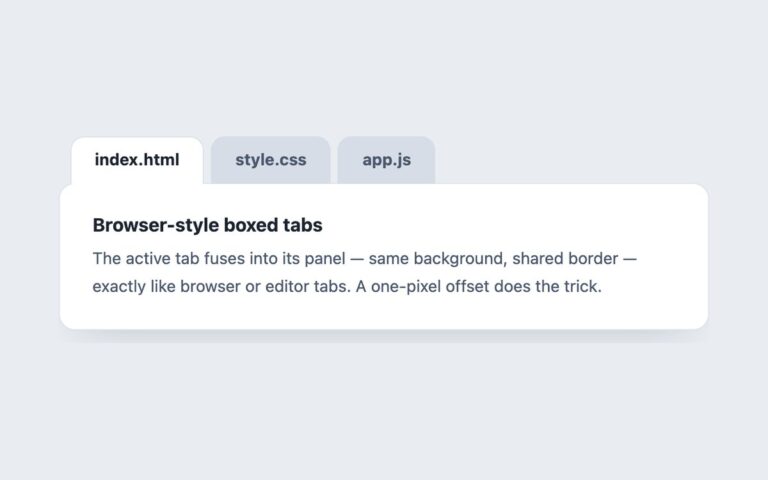
A browser-style tab strip with index.html, style.css and main.js, each tab carrying a close cross, and a plus button at the end that opens a new untitled tab. The selected tab turns white and joins the document area below it, while inactive tabs sit in a grey strip. Closing the selected tab hands the selection to its neighbour, closing the last one shows a short empty-state message, and new tabs are added as untitled-1.txt, untitled-2.txt and so on. Tabs shrink and truncate their names with an ellipsis before the strip starts to scroll, like a real browser. Use it for editors, multi-document tools, query consoles and chat or ticket workspaces. Keyboard users close the focused tab with the Delete key, which each tab describes to screen readers; the cross is a mouse shortcut for the same action. New tabs are cloned from the first tab and panel, so they keep every class and attribute. The Bootstrap version uses .nav-tabs with the Tab plugin and a small script for closing and adding.

What’s included

  • Close with the cross or the Delete key
  • Plus button opens new untitled tabs
  • Selection moves to the neighbour when a tab closes
  • Tabs shrink and truncate before the strip scrolls
  • Empty state when every tab is closed

Accessibility

Tabs sit in a tablist labelled Open documents and each has a description, Press Delete to close this tab. Only the selected tab is in the Tab order; Left and Right (or Up and Down) move between tabs and select them, and Home and End jump to the first and last tab. Delete closes the focused tab and moves focus to the newly selected one, or to the New tab button when none are left. The cross is aria-hidden and not focusable, focus draws a 2px indigo outline, and transitions are removed under prefers-reduced-motion.

Customise it

Change --ct-accent, --ct-strip, --ct-tab, --ct-tab-hover, --ct-muted, --ct-icon and --ct-text on .ctabs (plain CSS and Bootstrap), and the tab min-width and max-width to control truncation. In Tailwind edit the --color-ct-* theme colours and the min-w-[88px] and max-w-[170px] utilities.