Open demo

CSS code

HTML
<div class="lf">
<main class="lf-box">
  <a class="lf-back" href="#"><svg viewBox="0 0 24 24" aria-hidden="true"><path d="M19 12H5M11 18l-6-6 6-6"/></svg> Back to sign in</a>
  <form id="lf-reset">
    <h1>Reset your password</h1>
    <p class="lf-sub">Enter the email on your account and we'll send a link to set a new password.</p>
    <label class="lf-label" for="rmail">Email address</label>
    <input class="lf-field" id="rmail" name="email" type="email" autocomplete="email" placeholder="[email protected]" required>
    <button class="lf-btn" type="submit">Send reset link</button>
  </form>
  <div class="lf-sent" id="lf-sent" hidden>
    <div class="lf-tick" aria-hidden="true"><svg viewBox="0 0 24 24"><path d="M5 13l4 4L19 7"/></svg></div>
    <h1 tabindex="-1">Check your inbox</h1>
    <p class="lf-sub">If an account exists for that address, a reset link is on its way. The link works
      once and expires in 60 minutes.</p>
    <p class="lf-note">Nothing arrived? Check spam, then try again in a few minutes. We deliberately
      don't say whether an address is registered — that would let anyone test which emails have
      accounts here.</p>
  </div>
</main>
</div>
CSS
/* Password reset request and its confirmation. On submit the script swaps the form for the "Check your inbox"
   panel and moves focus to its heading, so screen readers announce the new state. */
.lf{--lf-brand:#4f46e5;--lf-brand-dark:#4338ca;--lf-ink:#111827;--lf-muted:#6b7280;--lf-line:#e5e7eb;--lf-edge:#868c99;--lf-bg:#f5f6fa;--lf-ok:#15803d;
  min-height:100vh;display:grid;grid-template-columns:minmax(0,1fr);place-items:center;padding:28px 20px;
  background:var(--lf-bg);color:var(--lf-ink);line-height:normal;
  font-family:-apple-system,BlinkMacSystemFont,"Segoe UI",Roboto,Helvetica,Arial,sans-serif}
.lf,.lf *,.lf *::before,.lf *::after{box-sizing:border-box}
.lf :where(h1,p,form){margin:0}
.lf :where(input,button){font:inherit}
.lf [hidden]{display:none!important}
.lf a{color:var(--lf-brand);text-decoration:none;font-weight:600}
.lf a:hover{text-decoration:underline}
.lf :focus-visible{outline:2px solid var(--lf-brand);outline-offset:2px}
.lf-box{width:100%;max-width:410px;background:#fff;border:1px solid var(--lf-line);border-radius:16px;
  padding:38px 34px;box-shadow:0 10px 34px rgba(17,24,39,.06)}
.lf-back{display:inline-flex;align-items:center;gap:6px;font-size:.87rem;margin-bottom:22px}
.lf-back svg{width:15px;height:15px;stroke:currentColor;fill:none;stroke-width:2.2}
.lf h1{font-size:1.4rem;letter-spacing:-.02em;margin-bottom:7px}
.lf h1:focus{outline:none}
.lf-sub{color:var(--lf-muted);font-size:.93rem;line-height:1.6;margin-bottom:26px}
.lf-label{display:block;font-size:.85rem;font-weight:600;margin-bottom:6px}
.lf-field{width:100%;padding:12px 14px;border:1px solid var(--lf-edge);border-radius:10px;font-size:.95rem;
  background:#fff;color:inherit;margin-bottom:20px;transition:border-color .15s,box-shadow .15s}
.lf-field::placeholder{color:var(--lf-muted)}
.lf-field:focus{outline:none;border-color:var(--lf-brand);box-shadow:0 0 0 3px rgba(79,70,229,.15)}
.lf-btn{width:100%;padding:13px;border:0;border-radius:10px;background:var(--lf-brand);color:#fff;
  font-size:.97rem;font-weight:700;cursor:pointer;transition:background .15s}
.lf-btn:hover{background:var(--lf-brand-dark)}
.lf-sent{text-align:center}
.lf-sent .lf-sub{margin-bottom:0}
.lf-tick{width:56px;height:56px;border-radius:50%;background:#dcfce7;display:grid;place-items:center;margin:0 auto 20px}
.lf-tick svg{width:28px;height:28px;stroke:var(--lf-ok);fill:none;stroke-width:2.4}
.lf-note{background:var(--lf-bg);border:1px solid var(--lf-line);border-radius:11px;padding:14px 16px;
  font-size:.86rem;color:var(--lf-muted);line-height:1.65;margin-top:20px;text-align:left}
@media (prefers-reduced-motion:reduce){.lf-field,.lf-btn{transition:none}}
JavaScript
// Demo only: swap the form for the confirmation. In production, show the confirmation after your
// server accepts the request, and send the same answer whether or not the address has an account.
(() => {
  const form = document.getElementById('lf-reset'), sent = document.getElementById('lf-sent');
  if (!form || !sent) return;
  form.addEventListener('submit', e => {
    e.preventDefault();
    form.hidden = true; sent.hidden = false;
    sent.querySelector('h1').focus();
  });
})();

Bootstrap 5 code

Requires: Bootstrap 5.3.8 CSS

HTML
<div class="lf d-grid">
<main class="card w-100">
  <div class="card-body">
    <a class="lf-back d-inline-flex align-items-center" href="#"><svg viewBox="0 0 24 24" aria-hidden="true"><path d="M19 12H5M11 18l-6-6 6-6"/></svg> Back to sign in</a>
    <form id="lf-reset">
      <h1>Reset your password</h1>
      <p class="lf-sub text-body-secondary">Enter the email on your account and we'll send a link to set a new password.</p>
      <label class="form-label" for="rmail">Email address</label>
      <input class="form-control" id="rmail" name="email" type="email" autocomplete="email" placeholder="[email protected]" required>
      <button class="btn btn-brand w-100" type="submit">Send reset link</button>
    </form>
    <div class="text-center" id="lf-sent" hidden>
      <div class="lf-tick rounded-circle" aria-hidden="true"><svg viewBox="0 0 24 24"><path d="M5 13l4 4L19 7"/></svg></div>
      <h1 tabindex="-1">Check your inbox</h1>
      <p class="lf-sub text-body-secondary mb-0">If an account exists for that address, a reset link is on its way. The link works
        once and expires in 60 minutes.</p>
      <p class="lf-note text-body-secondary text-start mb-0">Nothing arrived? Check spam, then try again in a few minutes. We deliberately
        don't say whether an address is registered — that would let anyone test which emails have
        accounts here.</p>
    </div>
  </div>
</main>
</div>
CSS
/* Bootstrap .card, .form-control and .btn, recoloured through Bootstrap's CSS variables.
   The script swaps the form for the confirmation with the hidden attribute and focuses its heading. */
.lf{--lf-brand:#4f46e5;--lf-brand-dark:#4338ca;--lf-ink:#111827;--lf-muted:#6b7280;--lf-line:#e5e7eb;--lf-edge:#868c99;--lf-ok:#15803d;
  --bs-body-color:var(--lf-ink);--bs-secondary-color:var(--lf-muted);--bs-border-color:var(--lf-edge);
  --bs-link-color-rgb:79,70,229;--bs-link-hover-color-rgb:67,56,202;
  min-height:100vh;grid-template-columns:minmax(0,1fr);place-items:center;padding:28px 20px;
  background:#f5f6fa;color:var(--lf-ink);line-height:normal}
.lf a{font-weight:600;text-decoration:none}
.lf a:hover{text-decoration:underline}
.lf :focus-visible{outline:2px solid var(--lf-brand);outline-offset:2px}
.lf .card{--bs-card-border-color:var(--lf-line);--bs-card-border-radius:16px;--bs-card-spacer-y:38px;--bs-card-spacer-x:34px;
  max-width:410px;box-shadow:0 10px 34px rgba(17,24,39,.06)}
.lf-back{gap:6px;font-size:.87rem;margin-bottom:22px}
.lf-back svg{width:15px;height:15px;stroke:currentColor;fill:none;stroke-width:2.2}
.lf h1{font-size:1.4rem;font-weight:700;line-height:normal;letter-spacing:-.02em;margin-bottom:7px}
.lf h1:focus{outline:none}
.lf-sub{font-size:.93rem;line-height:1.6;margin-bottom:26px}
.lf .form-label{font-size:.85rem;font-weight:600;margin-bottom:6px}
.lf .form-control{padding:12px 14px;border-radius:10px;font-size:.95rem;line-height:normal;margin-bottom:20px;transition:border-color .15s,box-shadow .15s}
.lf .form-control:focus{border-color:var(--lf-brand);box-shadow:0 0 0 3px rgba(79,70,229,.15);outline:none}
.lf .form-control::placeholder{color:var(--lf-muted)}
.lf .btn-brand{--bs-btn-line-height:normal;--bs-btn-border-width:0;--bs-btn-padding-y:13px;--bs-btn-font-size:.97rem;--bs-btn-font-weight:700;--bs-btn-border-radius:10px;
  --bs-btn-bg:var(--lf-brand);--bs-btn-border-color:var(--lf-brand);--bs-btn-color:#fff;
  --bs-btn-hover-bg:var(--lf-brand-dark);--bs-btn-hover-border-color:var(--lf-brand-dark);--bs-btn-hover-color:#fff;
  --bs-btn-active-bg:var(--lf-brand-dark);--bs-btn-active-border-color:var(--lf-brand-dark);--bs-btn-active-color:#fff;
  --bs-btn-focus-box-shadow:none;transition:background-color .15s}
.lf-tick{width:56px;height:56px;background:#dcfce7;display:grid;place-items:center;margin:0 auto 20px}
.lf-tick svg{width:28px;height:28px;stroke:var(--lf-ok);fill:none;stroke-width:2.4}
.lf-note{background:#f5f6fa;border:1px solid var(--lf-line);border-radius:11px;padding:14px 16px;font-size:.86rem;line-height:1.65;margin-top:20px}
@media (prefers-reduced-motion:reduce){.lf .form-control,.lf .btn{transition:none}}
JavaScript
// Demo only: swap the form for the confirmation. In production, show the confirmation after your
// server accepts the request, and send the same answer whether or not the address has an account.
(() => {
  const form = document.getElementById('lf-reset'), sent = document.getElementById('lf-sent');
  if (!form || !sent) return;
  form.addEventListener('submit', e => {
    e.preventDefault();
    form.hidden = true; sent.hidden = false;
    sent.querySelector('h1').focus();
  });
})();

Tailwind 4 code

Requires: Tailwind CSS 4

HTML
<div class="grid min-h-screen grid-cols-[minmax(0,1fr)] place-items-center bg-page px-5 py-7 font-[-apple-system,BlinkMacSystemFont,'Segoe_UI',Roboto,Helvetica,Arial,sans-serif] leading-[normal] text-ink">
<main class="w-full max-w-[410px] rounded-2xl border border-line bg-white px-[34px] py-[38px] shadow-[0_10px_34px_rgba(17,24,39,.06)]">
  <a class="mb-[22px] inline-flex items-center gap-1.5 text-[.87rem] font-semibold text-brand hover:underline focus-visible:outline-2 focus-visible:outline-offset-2 focus-visible:outline-brand" href="#"><svg class="size-[15px] fill-none stroke-current stroke-[2.2]" viewBox="0 0 24 24" aria-hidden="true"><path d="M19 12H5M11 18l-6-6 6-6"/></svg> Back to sign in</a>
  <form id="lf-reset">
    <h1 class="mb-[7px] text-[1.4rem] font-bold tracking-[-.02em]">Reset your password</h1>
    <p class="mb-[26px] text-[.93rem] leading-[1.6] text-muted">Enter the email on your account and we'll send a link to set a new password.</p>
    <label class="mb-1.5 block text-[.85rem] font-semibold" for="rmail">Email address</label>
    <input class="mb-5 w-full rounded-[10px] border border-edge bg-white px-3.5 py-3 text-[.95rem] transition-[border-color,box-shadow] duration-150 placeholder:text-muted focus:border-brand focus:shadow-[0_0_0_3px_rgba(79,70,229,.15)] focus:outline-none motion-reduce:transition-none"
           id="rmail" name="email" type="email" autocomplete="email" placeholder="[email protected]" required>
    <button class="w-full cursor-pointer rounded-[10px] bg-brand p-[13px] text-[.97rem] font-bold text-white transition-[background-color,border-color,color] duration-150 hover:bg-brand-dark focus-visible:outline-2 focus-visible:outline-offset-2 focus-visible:outline-brand motion-reduce:transition-none" type="submit">Send reset link</button>
  </form>
  <div class="text-center" id="lf-sent" hidden>
    <div class="mx-auto mb-5 grid size-14 place-items-center rounded-full bg-[#dcfce7]" aria-hidden="true"><svg class="size-7 fill-none stroke-ok stroke-[2.4]" viewBox="0 0 24 24"><path d="M5 13l4 4L19 7"/></svg></div>
    <h1 class="mb-[7px] text-[1.4rem] font-bold tracking-[-.02em] focus:outline-none" tabindex="-1">Check your inbox</h1>
    <p class="text-[.93rem] leading-[1.6] text-muted">If an account exists for that address, a reset link is on its way. The link works
      once and expires in 60 minutes.</p>
    <p class="mt-5 rounded-[11px] border border-line bg-page px-4 py-3.5 text-left text-[.86rem] leading-[1.65] text-muted">Nothing arrived? Check spam, then try again in a few minutes. We deliberately
      don't say whether an address is registered — that would let anyone test which emails have
      accounts here.</p>
  </div>
</main>
</div>
CSS
@theme {
  --color-brand: #4f46e5;
  --color-brand-dark: #4338ca;
  --color-ink: #111827;
  --color-muted: #6b7280;
  --color-line: #e5e7eb;
  --color-edge: #868c99;
  --color-page: #f5f6fa;
  --color-ok: #15803d;
}
JavaScript
// Demo only: swap the form for the confirmation. In production, show the confirmation after your
// server accepts the request, and send the same answer whether or not the address has an account.
(() => {
  const form = document.getElementById('lf-reset'), sent = document.getElementById('lf-sent');
  if (!form || !sent) return;
  form.addEventListener('submit', e => {
    e.preventDefault();
    form.hidden = true; sent.hidden = false;
    sent.querySelector('h1').focus();
  });
})();

About this set

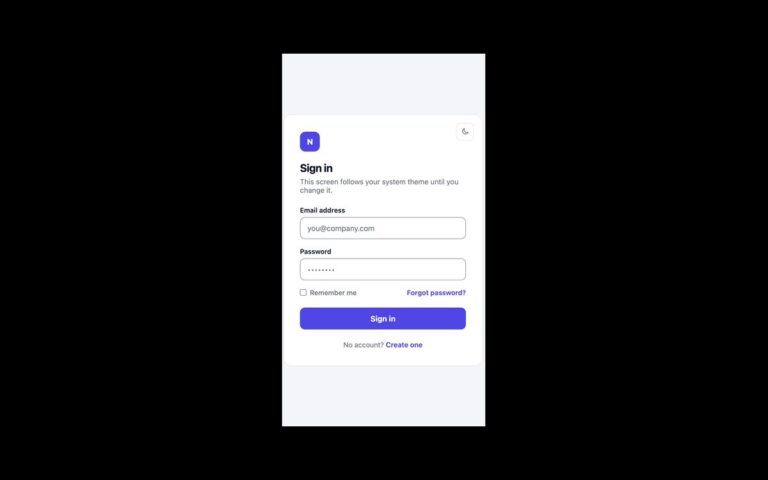
The forgotten-password screen and the confirmation that follows it. The form has a back-to-sign-in link, a heading, an email field and a Send reset link button. When it is submitted, a short script hides the form and shows the confirmation: a green tick, Check your inbox, a note that the link works once and expires in 60 minutes, and a grey box explaining that the page never says whether an address is registered, because that would let anyone test which emails have accounts. Use it as the target of every Forgot password link. The confirmation wording is deliberately the same whether or not the address exists; keep your server’s response identical too. The script moves focus to the confirmation heading, which has tabindex=”-1″, so screen readers announce the new state instead of staying on a form that has disappeared. The expiry time is copy; set it to whatever your server enforces. The Bootstrap version uses .card, .form-control and .btn, and the Tailwind version the same markup with utilities.

What’s included

  • Request form and sent confirmation in one card
  • Wording that does not reveal whether an account exists
  • Focus moves to the confirmation heading after submit
  • Back to sign in link with an arrow icon
  • Native email validation before the swap runs

Accessibility

The email field has a visible label and autocomplete="email". The confirmation is swapped in with the hidden attribute and receives focus on its heading, so the change is announced. Links, the field and the button show a 2px outline or a brand ring on focus, and transitions switch off under prefers-reduced-motion.

Customise it

Colours are --lf-brand, --lf-ok, --lf-edge and --lf-bg on .lf (plain CSS and Bootstrap) or --color-brand, --color-ok and the other theme values (Tailwind). Edit the expiry sentence to match your token lifetime.